Showing posts from Time Management category
Best On-Premise Employee Monitoring Software in 2026: Complete Guide & Tool Comparison
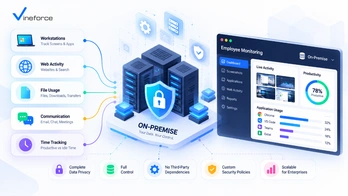
In an era of distributed teams, remote operations, and stringent cybersecurity standards, modern organizations face a twin imperative: maintaining operational visibility across daily workflows while maintaining absolute control over sensitive corporate data. > **Quick Summary:** On-premise employee monitoring software allows organizations to capture workforce activity insights, track time, and analyze application workflows while hosting all data on self-managed infrastructure. Unlike cloud SaaS, self-hosting delivers complete data residency, private storage control, and predictable scaling costs for security-conscious enterprises. Discover how [Vineforce Teams On-Premise](https://www.vineforce.net/teams/plans/on-premise) empowers organizations with deep productivity intelligence without surrendering infrastructure control. --- The Evolution of Workforce Visibility & Data Control Over the past decade, the rapid migration toward hybrid work and multi-app environments has expanded the digital footprint of every enterprise. Knowledge workers alternate daily between team messaging platforms, specialized desktop software, cloud suites, and project management tools. To optimize workflows and understand resource allocation, business leaders increasingly rely on workforce activity insights. However, traditional cloud-only software presents significant compliance and infrastructure questions for security-conscious enterprises: - **Third-Party Data Exposure**: Storing granular application logs, document titles, and desktop screenshots on multi-tenant cloud servers creates external dependency. - **Strict Data Residency**: Global organizations, financial institutions, and government defense contractors operate under strict regulations requiring internal data sovereignty. - **Escalating SaaS Costs**: Per-user subscription fees scale relentlessly as workforce headcounts grow, increasing long-term operating costs. - **Custom Security Integration**: Enterprise security teams often require custom network firewalls, localized backup policies, and dedicated database encryption standards. For these reasons, decision-makers are actively evaluating **on-premise employee monitoring software** and **self-hosted productivity solutions**. By hosting workforce telemetry on self-managed infrastructure, companies gain full control over their operational data while preserving workplace transparency. --- Understanding Deployment Models: On-Premise / Self-Hosted vs. Cloud Before reviewing individual software options, it is essential to understand the technical definitions governing software deployment. ``` +-----------------------------------------------------------------------------------+ | WORKFORCE MONITORING DEPLOYMENTS | +------------------------------------+----------------------------------------------+ | SELF-HOSTED / ON-PREMISE | CLOUD SAAS | +------------------------------------+----------------------------------------------+ | • Hosted on Private Hardware/Cloud | • Managed on Vendor Cloud Infrastructure | | • Full Database & Storage Control | • Data Stored in Multi-Tenant Databases | | • Internal Firewall & VPN Isolation| • Standard Vendor Security Policies | | • Scalable License Pricing | • Continuous Monthly Per-User Billing | +------------------------------------+----------------------------------------------+ ``` On-Premise Software Software installed on physical servers located within an organization's private data center or local office facilities. Access is governed by physical access controls and internal network parameters. Self-Hosted Software Software deployed and operated by the customer within customer-controlled infrastructure. This includes private cloud environments (such as AWS EC2, Azure VMs, or private Kubernetes clusters) as well as dedicated local servers. The defining feature is that **the customer owns and controls the execution environment and database storage**. Cloud-Hosted (SaaS) Software hosted on vendor-managed infrastructure. While quick to deploy, all employee activity logs, app history, and visual captures reside in vendor-controlled cloud databases. > _Note: In search queries and procurement evaluations, "on-premise" and "self-hosted" are frequently used interchangeably to describe software that grants customer-level data control._ --- Why Organizations Choose Self-Hosted Employee Monitoring Selecting a self-hosted productivity tracking architecture provides key strategic advantages for organizations operating in complex or regulated sectors. ``` +----------------------------------+ | SELF-HOSTED VALUE PILLARS | +----------------------------------+ | +-------------------+-----------+-----------+-------------------+ | | | | +--------------+ +---------------+ +---------------+ +---------------+ | Data | | Security | | Data | | Economic | | Ownership | | Controls | | Residency | | Predictability| +--------------+ +---------------+ +---------------+ +---------------+ | Customer DB | | Local Access | | Local Geography| | Predictable | | Full Logs | | Custom Backup | | Sovereign Logs| | Team Scaling | +--------------+ +---------------+ +---------------+ +---------------+ ``` 1. Total Data Ownership and Storage Control When monitoring application usage, active time, and task workflows, the software captures detailed telemetry. In a self-hosted environment, every byte of data—from database tables to screenshot image blobs—remains inside customer storage buckets. Enterprise IT administrators retain direct SQL access for custom business intelligence reporting and internal audits. 2. Enhanced Infrastructure Security Controls Self-hosting enables security engineers to apply custom network perimeter controls. Organizations can: - Isolate monitoring server endpoints behind internal corporate VPNs. - Enforce strict Web Application Firewalls (WAF) and IP whitelist rules. - Integrate logging directly into existing Security Information and Event Management (SIEM) tools. - Implement custom disk encryption (AES-256) using customer-managed cryptographic keys. To learn more about modern architecture safeguards, refer to our research on [how advanced security measures safeguard SaaS applications](/how-advanced-security-measures-can-safeguard-your-saas-application). 3. Support for Data Residency Requirements Organizations in healthcare, defense, financial services, and legal advisory must guarantee that sensitive internal operational data does not cross international borders or enter third-party cloud boundaries. Self-hosted deployments help companies align software infrastructure with their internal data residency policies. 4. Cost Predictability at Scale Cloud-only SaaS tools typically charge $10 to $25+ per user per month. For a workforce of 200 to 1,000+ employees, recurring SaaS costs accumulate rapidly. Self-hosted licensing models often offer volume-tiered or infrastructure-based licensing, significantly lowering the long-term per-user cost as organizations expand. --- On-Premise vs. Cloud Employee Monitoring: Comprehensive Breakdown Evaluating deployment architecture requires weighing operational trade-offs across infrastructure, security, and administrative overhead. | Architectural Dimension | Self-Hosted / On-Premise | Cloud-Hosted (SaaS) | | :---------------------------- | :------------------------------------------------ | :----------------------------------- | | **Infrastructure Management** | Customer-managed (Local servers or private cloud) | Vendor-managed multi-tenant cloud | | **Data Storage & Residency** | 100% customer-controlled local storage | Vendor cloud (AWS/GCP/Azure tenant) | | **Network Perimeter** | Operates inside private firewalls/VPNs | Exposed to public internet endpoints | | **Database Access** | Direct access to raw SQL/NoSQL storage | API-restricted or export-only access | | **Backup & Retention** | Unlimited, customizable retention schedules | Restricted by vendor storage tiers | | **Deployment Speed** | Requires initial container/server setup | Instant sign-up and agent download | | **Maintenance & Updates** | Customer-managed / guided upgrade path | Automatic vendor background updates | | **IT Resource Need** | Requires internal system administration | Minimal IT overhead | | **Long-Term Scaling Cost** | High cost efficiency at scale | Scales linearly per user per month | Neither model is universally superior; cloud platforms suit smaller teams seeking immediate deployment without IT management, whereas self-hosted platforms are designed for organizations prioritizing control, data sovereignty, and long-term economic efficiency. --- Buyer Checklist: Essential Features for Self-Hosted Productivity Tools When shortlisting self-hosted workforce analytics platforms, evaluate solutions across core feature categories to ensure comprehensive productivity insights without compromising system performance: ``` +-----------------------------------------------------------------------------------+ | SELF-HOSTED EVALUATION CHECKLIST | +--------------------------+--------------------------------------------------------+ | FEATURE CATEGORY | KEY CAPABILITIES TO VERIFY | +--------------------------+--------------------------------------------------------+ | Time & Activity Tracking | • Smart idle detection & automated shift tracking | | | • Offline time buffer & background synchronization | | App & Website Analytics | • Categorized application & URL monitoring | | | • Shadow IT detection & non-productive flags | | Contextual Screenshots | • Customizable interval frequency & selective blurring | | | • Role-based view permissions & privacy policies | | Server Architecture | • Docker / Kubernetes containerization support | | | • Customer-managed PostgreSQL / MySQL / S3 storage | | Administration & Governance| • Role-based access control (RBAC) & SSO integration | | | • Configurable data retention & automated purging | +--------------------------+--------------------------------------------------------+ ``` 1. **Automated Time & Shift Tracking**: Continuous tracking of active working hours, break periods, and task allocation without manual input friction. 2. **Application & URL Visibility**: Detailed categorizations showing time spent across desktop applications, developer environments, web browsers, and cloud portals. 3. **Smart Idle Detection**: Intelligent algorithms that detect keyboard/mouse inactivity to prevent inflated hours while accounting for meetings and offline work. 4. **Privacy-Conscious Screenshots**: Optional, customizable screenshot capture with frequency controls, blurring options, and clear notification indicators for team transparency. 5. **Project & Task Attribution**: Capability to map active hours to specific client projects, internal work orders, or operational cost centers. 6. **Offline Time Buffering**: Local agent storage that records activity securely when employees work offline or during network outages, syncing back once reconnected. 7. **Containerized Server Deployment**: Modern container support (Docker, Docker Compose, or Helm charts) for straightforward deployment into Linux environments. 8. **Configurable Data Retention**: Granular controls permitting administrators to set retention limits (e.g., auto-purging raw activity logs after 90 days while preserving summary metrics). --- Comparison of the Best On-Premise Employee Monitoring Software Tools The following table compares leading platforms supporting self-hosted or on-premise deployment options in 2026. | Software Platform | Self-Hosted Support | Time Tracking | App & URL Usage | Screenshot Capture | Productivity Analytics | Custom DB Storage | Target Use Case | | :------------------ | :------------------------------- | :------------ | :---------------- | :----------------- | :------------------------------ | :------------------------ | :------------------------------------------------------------------------ | | **Vineforce Teams** | **Yes (On-Premise Plan)** | **Advanced** | **Comprehensive** | **Configurable** | **AI-Powered** | **Full Customer Control** | **Modern security-conscious teams, hybrid enterprises & mid-market orgs** | | **WorkTime** | Yes (On-Premise) | Standard | Standard | No (Privacy-First) | Basic | Customer Managed | Privacy-focused organizations seeking zero screenshot capture | | **Veriato** | Yes (On-Premise) | Basic | Comprehensive | High-Frequency | Security/Insider Threat | Customer Managed | Enterprise insider threat detection & security auditing | | **Teramind** | Yes (On-Premise / Private Cloud) | Advanced | Comprehensive | Comprehensive | User Behavioral Analytics (UBA) | Customer Managed | Large enterprises requiring DLP & behavioral compliance | | **InterGuard** | Yes (On-Premise) | Standard | Standard | Advanced | Compliance Focused | Customer Managed | Regulated financial & healthcare compliance monitoring | --- Detailed Analysis of Top Self-Hosted Software Vendors 1. Vineforce Teams (On-Premise) [Vineforce Teams](https://vineforce.net/teams/) delivers a modern productivity intelligence and workforce visibility platform built specifically to support healthy workplace transparency, team focus, and operational efficiency. Unlike legacy monitoring software designed around surveillance, Vineforce Teams approaches workforce insights from a productivity-first perspective. Its [On-Premise Edition](https://www.vineforce.net/teams/plans/on-premise) allows organizations to run the platform within their own customer-controlled server environment—giving IT leaders absolute authority over where active time records, application logs, and visual snapshots are stored. ``` +-----------------------------------------------------------------------------------+ | VINEFORCE TEAMS ON-PREMISE ARCHITECTURE | +-----------------------------------------------------------------------------------+ | | | +--------------------+ Encrypted Telemetry +---------------------------+ | | | Desktop Client | -------------------------> | Customer Server Gateway | | | | (Windows / macOS) | (HTTPS / TLS) | (Docker / Private Cloud) | | | +--------------------+ +---------------------------+ | | | | | +-------------+-------------+ | | | | | | +---------------+ +---------------+ | | Private DB | | Private S3/FS | | | (Activity Log)| | (Screenshots) | | +---------------+ +---------------+ | | +-----------------------------------------------------------------------------------+ ``` Deployment Architecture Vineforce Teams On-Premise is delivered via containerized packages, allowing seamless deployment onto customer-managed cloud VMs (AWS EC2, Azure Virtual Machines, Google Cloud Engine) or local Linux hardware servers. Customers connect their own PostgreSQL database and object storage buckets. Key Features - **Comprehensive Activity Tracking**: Tracks active hours, idle intervals, application usage, and browser activity. - **Smart Workday Intelligence**: Provides clear activity timelines showing deep focus work versus administrative overhead. - **Contextual Visual Verification**: Configurable screenshot captures with customizable intervals and permission controls. - **Offline Tracking Buffer**: Captures data during internet interruptions and synchronizes automatically upon reconnect. - **Role-Based Analytics**: Dashboard permissions tailored for department managers, team leads, and IT administrators. - **Data Retention Purging**: Native administrative options to schedule automated data cleanup according to internal corporate policies. Strengths - Modern, clean user interface designed for both management clarity and employee transparency. - Full independence from third-party vendor cloud storage. - Combines time tracking, application usage, and shift management into a unified platform. - Flexible pricing model optimized for sustainable long-term scaling. Best Fit For Mid-market companies, technology firms, remote agencies, and security-minded organizations that want modern productivity insights without entrusting corporate activity logs to public SaaS servers. Explore details on the [Vineforce Teams On-Premise Plan](https://www.vineforce.net/teams/plans/on-premise). --- 2. WorkTime On-Premise WorkTime is a established vendor in the workforce monitoring landscape, widely recognized for its strict "privacy-first" monitoring philosophy. Deployment Model WorkTime offers an On-Premise executable installer that runs on Windows Server infrastructure, storing activity data inside local database engines. Key Features - **Non-Invasive Activity Monitoring**: Tracks total active time, computer usage, and app usage without capturing screenshots. - **Attestation & Attendance Tracking**: Monitors login/logout timestamps and system lock status. - **Zero Document Content Recording**: Focuses strictly on executable names and web domains. Strengths & Limitations - **Strengths**: High employee trust due to the total exclusion of screenshot capabilities; minimal server storage requirements. - **Limitations**: Interface feels dated compared to modern web apps; lacks visual context mechanisms for verified output auditing. Best Fit For Highly unionized environments, European organizations with strict worker council privacy agreements, or companies seeking basic attendance stats without visual recording. --- 3. Veriato Vision (Formerly SpectorSoft) Veriato is a long-standing enterprise platform primarily focused on insider risk management, security auditing, and user activity logging. Deployment Model Veriato offers server installations that deploy across corporate Active Directory domains, writing data to dedicated Microsoft SQL Server databases. Key Features - **High-Frequency Keystroke & Screen Recording**: Continuous background recording of screen activity and application interaction. - **Insider Threat Scoring**: Anomaly detection algorithms that flag high-risk data export behaviors. - **Psycholinguistic Analysis**: Analyzes written communications across email and chat applications for sentiment anomalies. Strengths & Limitations - **Strengths**: Deep forensic auditing capabilities for enterprise risk management and legal investigations. - **Limitations**: High system resource footprint on endpoints; heavy surveillance orientation can negatively impact employee morale if used for general team management. Best Fit For Financial institutions, defense contractors, and high-security enterprise environments needing strict insider threat prevention. --- 4. Teramind On-Premise & Private Cloud Teramind is a powerful analytics platform combining user activity monitoring with Data Loss Prevention (DLP) capabilities. Deployment Model Teramind provides virtual appliance images (OVA/ISO) for deployment on VMware, Hyper-V, AWS, or Azure private cloud infrastructure. Key Features - **User Behavior Analytics (UBA)**: Identifies deviations from normal activity patterns. - **Integrated Data Loss Prevention**: Rules-based engine that blocks file transfers, USB writes, or copy-paste actions containing sensitive content (e.g., PII, credit card numbers). - **OCR Search in Screen Recording**: Optical character recognition allowing administrators to search for specific text inside recorded video sessions. Strengths & Limitations - **Strengths**: Robust security enforcement and comprehensive forensic reporting. - **Limitations**: Higher licensing cost structure; complex setup and policy configuration requirements. Best Fit For Large enterprises requiring integrated DLP enforcement alongside workforce monitoring. --- 5. InterGuard InterGuard by Awareness Technologies provides multi-endpoint security and employee activity monitoring for centralized IT management. Deployment Model Supports on-premise server deployment with SQL database backends, as well as hybrid cloud configurations. Key Features - **Web Filtering & Blocking**: Restricts access to unauthorized categories or specific URLs. - **File Movement Tracking**: Logs file rename, deletion, upload, and print actions. - **Remote Endpoint Control**: Allows administrators to lock or wipe endpoints remotely in case of theft. Strengths & Limitations - **Strengths**: Strong endpoint policy enforcement features for remote laptop fleets. - **Limitations**: Interface complexity can require a steeper learning curve for non-technical managers. Best Fit For Regulated mid-market businesses requiring endpoint policy enforcement alongside activity tracking. --- Architectural Deep Dive: Vineforce Teams On-Premise vs. Cloud Platforms When evaluating [Vineforce Teams](https://vineforce.net/teams/) for self-hosted deployment, understanding how it differs from conventional cloud platforms highlights key operational advantages: | Capability / Dimension | Vineforce Teams On-Premise | Typical Cloud-Only Platform | | :----------------------------- | :------------------------------------------------ | :------------------------------------- | | **Server Hosting Environment** | Customer AWS / Azure / Private Linux Servers | Public multi-tenant cloud cluster | | **Database Ownership** | Customer PostgreSQL / MySQL instance | Vendor shared multi-tenant DB | | **Screenshot Storage** | Private S3 / Blob storage bucket | Vendor cloud storage | | **Network Isolation** | Deployable within private VPCs & corporate VPNs | Requires open outbound web traffic | | **Custom Data Retention** | Unlimited retention (Customer storage permitting) | Fixed by plan (e.g., 30 to 90 days) | | **Direct SQL Access** | Yes—Full query access for internal BI tools | Restricted to CSV exports or REST APIs | | **Security Auditing** | Customer SIEM & internal log integration | Standard vendor log dashboard | | **Licensing Model** | Predictable volume & deployment licensing | Linear monthly per-user subscription | To understand how productivity analytics bridge modern operational gaps, read our analysis on [why modern teams need a productivity platform](/why-modern-teams-need-vineforce-teams-productivity-platform). --- Total Cost of Ownership (TCO): On-Premise vs. Cloud SaaS A primary driver for choosing a self-hosted architecture is the long-term total cost of ownership at scale. While cloud SaaS offers zero initial infrastructure cost, its recurring fee structure grows indefinitely as team size increases. ``` TOTAL COST OF OWNERSHIP (TCO) COMPARISON OVER 3 YEARS (500 USERS) COST ($) ^ | / Cloud SaaS ($15/user/mo = $90,000/yr) | / | / | / <-- Cumulative Cloud Cost: $270,000 | / | +-------------------------------+ <-- Self-Hosted (License + Private Cloud Inf): | | | Estimated Cumulative Cost: $110,000 | +-------------------------------+ +-----------------------------------------------------------------------------> TIME Year 1 Year 2 Year 3 ``` Cost Breakdown Factors 1. Software Licensing - **Cloud SaaS**: $12–$25 per user/month. For 500 users over 3 years, this totals **$216,000 – $450,000**. - **Self-Hosted**: Software license structured around tier brackets or self-hosted deployment packages, reducing the effective per-user licensing burden. 2. Infrastructure & Storage - **Cloud SaaS**: Included in subscription (subject to data cap upsells). - **Self-Hosted**: Private cloud VM (e.g., 8-core, 32GB RAM instance) + S3/Blob storage costs (~$150–$400/month depending on screenshot volume and retention policy). 3. IT Operations & Maintenance - **Cloud SaaS**: Vendor handles updates automatically. - **Self-Hosted**: Requires ~1–2 hours per month of internal IT maintenance for patch updates and database backup verification. Economic Summary For teams under 30 employees, cloud SaaS is often cheaper due to zero server overhead. However, for organizations with **50+ to 1,000+ employees**, self-hosted deployment using platforms like Vineforce Teams delivers substantial cumulative cost savings over a multi-year horizon. Review detailed plan options on the [Vineforce Teams Pricing Page](https://www.vineforce.net/teams/pricing). --- Security, Maintenance, and Governance Responsibilities While self-hosting offers superior infrastructure control, it shifts specific operational responsibilities to the customer's IT team. Organizations must maintain disciplined governance across several areas: ``` +-----------------------------------------------------------------------------------+ | SHARED GOVERNANCE & RESPONSIBILITY MATRIX | +------------------------------------+----------------------------------------------+ | VENDOR RESPONSIBILITIES | CUSTOMER IT RESPONSIBILITIES | +------------------------------------+----------------------------------------------+ | • Core Application Binaries | • Operating System Security & Patching | | • Desktop Agent Updates | • Database Backups & Disaster Recovery | | • Software Bug Fixes | • Network Firewall & VPN Management | | • Documentation & Setup Guides | • Storage Bucket Access Policy Enforcements | +------------------------------------+----------------------------------------------+ ``` 1. Operating System Patching Host servers running Docker or Linux distribution packages must be updated regularly with vendor security patches to protect against OS-level vulnerabilities. 2. Database Backup Strategies IT administrators should implement automated daily backups of the PostgreSQL or MySQL database, with off-site replication to guard against server hardware failure. 3. Storage Access Policies Object storage buckets containing screenshot artifacts must be locked down with IAM policies to prevent unauthorized access. 4. Responsible Monitoring Policies Self-hosted tools give managers powerful visibility, but clear organizational policies build trust. Best practices include: - Informing employees about what activity is tracked during working hours. - Establishing clear guidelines on personal time vs. active work time. - Restricting dashboard view access strictly to direct supervisors and department leads. For deployment container reference patterns, explore our guide on [Docker for enterprise software deployment](/docker-for-asp-net-zero-saas-in-easy-deployment). --- Target Audience: Who Should Choose Self-Hosted Employee Monitoring? Self-hosted workforce productivity software is designed for organizations with specific technical or business requirements: ``` +-----------------------------------------------------------------------------------+ | WHO BENEFITS MOST FROM SELF-HOSTING? | +-----------------------------------------------------------------------------------+ | [Security-Conscious Enterprise] --> Complete Isolation behind Corporate VPNs | | [Healthcare & Financial Services]--> Strict Local Data Sovereignty Compliance | | [Software & Technology Firms] --> Direct SQL Database Integration & BI | | [Growing Mid-Market Orgs (50+)] --> Substantial Per-User Cost Savings at Scale | +-----------------------------------------------------------------------------------+ ``` - **Security-Conscious Enterprises**: Organizations maintaining zero-trust architecture or strict air-gapped network policies. - **Healthcare & Financial Organizations**: Businesses that require complete isolation of employee communications and document activity. - **Software Engineering & IT Firms**: Companies with in-house sysadmin resources that prefer direct database access for custom reporting pipelines. - **Companies with strict Data Residency Rules**: Organizations operating in regions where employee data must reside on local physical servers. - **Scaling Mid-Market Organizations (50 to 1,000+ staff)**: Companies seeking to avoid escalating per-user monthly SaaS fees. --- Who Should Choose Cloud-Hosted (SaaS) Instead? To provide a balanced perspective, self-hosted deployment is not necessary for every business. Cloud-hosted software remains the ideal choice for: - **Micro-Teams & Startups (< 20 employees)**: Organizations needing immediate setup without dedicated IT staff. - **Companies Without IT Infrastructure**: Businesses that do not maintain cloud accounts (AWS/Azure) or internal server management capabilities. - **Short-Term Projects**: Operations requiring temporary workforce tracking for seasonal contracts. --- Deployment Prerequisites for Self-Hosted Software Before initiating a self-hosted installation, your IT infrastructure team should prepare the following technical foundation: ``` +-----------------------------------------------------------------------------------+ | TECHNICAL DEPLOYMENT PREREQUISITES | +-----------------------------------------------------------------------------------+ | 1. HOST SERVER | 64-bit Linux OS (Ubuntu 22.04 LTS+, RHEL, Debian) | | | 4 to 8 vCPU Cores | 16GB - 32GB RAM | 100GB SSD Root Volume | | 2. RUNTIME ENVMNT | Docker Engine (v24.0+) & Docker Compose (v2.20+) | | 3. DATABASE ENGINE | Managed PostgreSQL 14+ or MySQL 8.0+ instance | | 4. OBJECT STORAGE | AWS S3, Azure Blob Storage, MinIO, or Local Attached Volume | | 5. NETWORK & SSL | Domain A-Record | Valid SSL/TLS Certificate (Certbot/Custom)| +-----------------------------------------------------------------------------------+ ``` 1. **Host Hardware/VM Allocation**: - Minimum: 4 vCPU cores, 16 GB RAM, 100 GB SSD storage (supports ~100–250 active endpoints). - Recommended for 500+ endpoints: 8 vCPU cores, 32 GB RAM, dedicated database server. 2. **Container Engine**: Docker v24.0+ and Docker Compose installed on host OS. 3. **Database Server**: Access to a PostgreSQL 14+ or MySQL 8.0+ database instance with admin provisioning rights. 4. **Storage Endpoint**: Amazon S3 bucket, Azure Blob container, or local S3-compatible storage (e.g., MinIO) for asset management. 5. **Domain & SSL Certificate**: A fully qualified domain name (e.g., `insights.yourcompany.com`) with valid TLS/SSL certificates to secure agent communications. --- 15 Essential Questions to Ask Software Vendors Before Buying When evaluating self-hosted software providers, ask vendors these critical technical and commercial questions during product demos: 1. _Does your software run as a self-contained container (Docker/Helm) inside our private cloud?_ 2. _Is any employee activity data, telemetry, or analytics sent back to vendor servers?_ 3. _Can we supply our own database (PostgreSQL/MySQL) and storage buckets (S3/Blob)?_ 4. _Where are screenshot files and activity logs stored, and how are they encrypted at rest?_ 5. _Does the software support direct SQL database queries for integration with internal BI tools like PowerBI or Tableau?_ 6. _How are software updates and security patches delivered to our self-hosted server instance?_ 7. _Can we configure automated data retention policies to purge raw logs after a specified period?_ 8. _What happens to client desktop agents if the self-hosted server experiences temporary downtime?_ 9. _What network ports and outbound protocols are required for desktop agents to communicate with the server gateway?_ 10. _Does your platform support single sign-on (SSO) via SAML 2.0, Azure AD, or OAuth?_ 11. _What are the system resource requirements (CPU/RAM/Disk) for running desktop monitoring agents on client machines?_ 12. _Can visual screenshot capture be selectively disabled for specific departments or user groups?_ 13. _What licensing model applies to self-hosted deployments (tiered, capacity-based, or per-seat)?_ 14. _What level of technical support is included during initial server installation and configuration?_ 15. _Can the server scale horizontally to support thousands of endpoints across multiple geographical offices?_ --- Frequently Asked Questions (FAQ) What is on-premise employee monitoring software? On-premise employee monitoring software is a workforce productivity platform installed and operated directly within an organization's private physical servers or private cloud infrastructure, ensuring full data residency and local storage control. What is the difference between self-hosted and cloud employee monitoring? Self-hosted software runs inside infrastructure managed directly by your organization, storing database logs and screenshots locally. Cloud employee monitoring is managed on vendor-controlled infrastructure on a multi-tenant cloud subscription model. Is self-hosted employee monitoring more secure than cloud monitoring? Self-hosting gives organizations full sovereignty to apply custom firewalls, isolation controls, and internal encryption standards. However, security ultimately depends on the customer's internal patch management and network architecture. Where is employee activity data stored in a self-hosted deployment? In a self-hosted setup, all activity logs, time records, app/URL usage telemetry, and screenshots are saved in customer-controlled databases and private storage buckets rather than vendor servers. Can self-hosted employee monitoring software track remote employees? Yes. Remote desktop agents securely sync encrypted telemetry back to your organization's self-hosted server gateway or private cloud endpoint over secure HTTPS/VPN channels. Does self-hosting assist with corporate data residency requirements? Yes. Operating workforce monitoring platforms within designated regional servers allows enterprises to satisfy strict data residency policies and internal sovereignty rules. Is Vineforce Teams available as an on-premise or self-hosted deployment? Yes. Vineforce Teams provides an On-Premise licensing option for organizations that require total data ownership, private storage, and custom containerized server hosting. Does Vineforce Teams charge per employee for self-hosted licensing? Vineforce Teams offers flexible self-hosted deployment packages structured for growing teams and enterprises seeking scalable, predictable workforce management costs. Can screenshot captures be saved directly on customer infrastructure? Yes. With self-hosted platforms like Vineforce Teams On-Premise, visual screenshots and activity telemetry remain exclusively on customer-managed storage servers. Which employee monitoring platforms support self-hosted infrastructure in 2026? Leading platforms offering true self-hosted or on-premise deployment include Vineforce Teams, WorkTime, Veriato, Teramind, and InterGuard. Is Hubstaff self-hosted? No. Hubstaff operates strictly as a cloud-hosted (SaaS) workforce management solution with vendor-managed cloud storage. Is ActivTrak self-hosted? No. ActivTrak is a cloud-native workforce analytics platform hosted entirely on vendor infrastructure. --- Recommended User Journey & Next Steps When evaluating productivity solutions for your organization, follow this recommended research path: 1. **Review Your Requirements**: Assess internal data residency policies, infrastructure capabilities, and team scaling targets. 2. **Explore Vineforce Teams Features**: Understand core activity tracking, time management, and shift analytics on the [Vineforce Teams Product Page](https://vineforce.net/teams/). 3. **Evaluate On-Premise Deployment**: Learn about custom server installation, container support, and storage control on the [Vineforce Teams On-Premise Page](https://www.vineforce.net/teams/plans/on-premise). 4. **Compare Commercial Options**: Examine licensing structures and cost efficiencies on the [Vineforce Teams Pricing Page](https://www.vineforce.net/teams/pricing). 5. **Get Started**: Request a tailored deployment trial or create your account at [Vineforce Teams Signup](https://vineforceteams.com/). > Ready to take total control of your workforce productivity data and infrastructure environment? Explore [Vineforce Teams On-Premise](https://www.vineforce.net/teams/plans/on-premise) today.

Time Management in Organizations
Introduction Time doesn't stop for anyone. The one who matches himself with time has no regrets in life. This is the reason it is regarded as the most valuable asset of life. Everything done on time gives positive vibes, however, the wastage of time makes you pay the price. Time is one of the foundation stones for a successful organization. The hands of the clock can become the wheels of success for an organization in the following ways: Maintaining Workflow An organization comprises of various functional units or departments. The significance of pursuing work by harmonizing all functional units together can't be overlooked. The information from one department can be the means to achieve a goal for other departments. Synchronizing inter-department and intra-department activities with time becomes an important tool to meet the deadlines of the work area. The dependency disallows anyone to neglect the vitality of time, wherein doing so can make the innocent bear heavy price. Scheduling Tasks Scheduling the tasks before starting your day can be another powerful tool to reach the extra mile at the same time. It is necessary to plan your work for the next day ahead of time, which creates your short-term goals for that day. One can make use of time schedule software to avoid unnecessary wastage of time at one task. Prioritizing Work It is difficult to handle various tasks with the same level of efficiency. Assigning priorities to your tasks can be fruitful in time-based management of various tasks. Effective Communication Meetings and discussions are an integral part of an organization. Several members of the organization take out time to attend seminars and meetings. They put in their work hours to attend such meetings. The presenter or orator should address the audience calculating the total work hours per person of all members participating in the session. The sessions and communication should leave an impression to compensate the time taken for such session. Along with this, the listeners should take home the lesson that will help them in progression. Cutting Off Distractions Avoiding procrastination, distractions and generating meaningful interpretations can act as a vision to lead in life. This, in turn, can help in reaching the deadlines at the workplace on time and boosting the overall productivity in the organization. Raising Professionalism An employee should not only value his time, but he should understand that time is precious for other members also. He can raise the standards of professionalism in the company by carrying out meaningful and result-oriented tasks. By inculcating the above factors while managing time in the organization, one can witness the following benefits: **High Productivity** Effective utilization of time will make them highly efficient and productive working professionals. **Less Stress and Anxiety** The members of the organization are less likely to feel any stress or anxiety at their workplace. Sorting their work according to time and need will reduce half of their problems. **More Opportunities and Career Growth** The members can look forward to attaining higher goals in life which would brighten the chances of their career growth. **Motivation** Fulfilling the goals on time will not only give a sense of achievement, but it will also increase overall efficiency and management. Conclusion In conclusion, time management is a vital pillar of organizational success, driving productivity, reducing stress, and fostering growth. By synchronizing workflows, scheduling tasks, and prioritizing effectively, teams can meet deadlines and achieve higher efficiency. Effective communication and professionalism further enhance workplace dynamics, ensuring meaningful engagement and mutual respect. Time management not only boosts motivation but also unlocks opportunities for career advancement. Respecting time empowers organizations to overcome challenges and achieve lasting success.
Why Modern Teams Need Vineforce Teams Productivity Platform
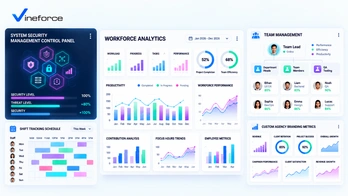
The landscape of modern business has changed fundamentally over the last decade. With the widespread adoption of remote, hybrid, and distributed teams, employees execute complex workflows across multiple cities, time zones, and dozens of SaaS applications. > **Quick Summary:** A team productivity software platform is an essential tool for modern hybrid and remote organizations. Unlike manual timesheets, it combines automatic time tracking, application and website usage insights, and activity analytics to help organizations understand how work happens, resolve workflow bottlenecks, and secure digital assets. Learn more about [Vineforce Teams](https://vineforce.net/teams/). --- The Modern Workplace Productivity Challenge While remote and hybrid models offer unprecedented flexibility, they introduce key operational challenges. Without physical proximity, business owners and managers struggle to understand how daily work actually unfolds. Traditional output measurement often fails due to: - **Application Fragmentation**: Switching between chat, email, code repositories, and project boards dilutes focus and hides actual time allocation. - **Distraction & Alert Fatigue**: Constant notifications interrupt deep focus sessions for knowledge workers. - **Manual Reporting Friction**: Spreadsheet timesheets waste valuable hours and yield inaccurate, retrospective data. - **Lack of Objective Insights**: Relying on assumptions leads to micromanagement or missed signs of team burnout. - **Shadow IT Security Risks**: Working outside corporate networks increases exposure to unapproved software and data compliance risks. --- What Is a Productivity Intelligence Platform? Unlike basic time trackers that only log static hours (e.g., "4 hours on coding"), modern **productivity intelligence** provides real-time activity context during working hours. It maps out active working hours, application and website usage, continuous task timelines, and focus ratios. This approach provides **workforce analytics** that reveal *how* work gets done, fostering operational transparency rather than rigid oversight. --- Key Capabilities of Vineforce Teams To bridge the gap between team activity and operational visibility, [Vineforce Teams](https://vineforce.net/teams/) offers a robust suite of workforce intelligence features designed for modern company owners, administrators, and growing teams: 1. [Zero-Click Mode](https://vineforce.net/teams/features/zero-click-mode/) Eliminates manual timer management by automatically logging active work sessions when team members start their day, ensuring zero friction and seamless background operation. 2. [App & URL Tracking](https://vineforce.net/teams/features/app-url-tracking/) Categorizes application usage and visited websites into productive tools versus potential distractions, helping optimize SaaS license usage and establish focus guidelines. 3. [Screenshots Monitoring](https://vineforce.net/teams/features/screenshots-monitoring/) Provides optional visual context with privacy-first configurations, including customizable capture intervals and blurring options for transparent client verification. 4. [Offline Time Tracking](https://vineforce.net/teams/features/offline-time-tracking/) Ensures continuous activity recording even during network outages or travel, automatically synchronizing data once internet connectivity is restored. 5. [Smart Idle Detection](https://vineforce.net/teams/features/smart-idle-detection/) Detects periods of keyboard and mouse inactivity to pause tracking automatically, preventing inflated hours and maintaining clean, accurate billing metrics. 6. [User Attentiveness & Analytics](https://vineforce.net/teams/features/user-attentiveness/) Analyzes focus distribution and engagement trends, providing actionable reports that help managers identify workflow bottlenecks and prevent employee burnout. 7. [System Management](https://vineforce.net/teams/features/system-management/) Centralizes administrative controls and policy settings across corporate endpoints, giving IT directors complete authority over tracking rules, permissions, and security compliance. 8. [Shift Tracking](https://vineforce.net/teams/features/shift-tracking/) Simplifies workforce scheduling with automated shift monitoring, overtime tracking, and multi-timezone attendance verification across distributed teams. 9. [Team Management](https://vineforce.net/teams/features/team-management/) Streamlines organizational hierarchies, group-level permissions, and project resource assignments to keep managers aligned with individual and team output. 10. [Custom Branding](https://vineforce.net/teams/features/custom-branding/) Enables agencies and enterprises to apply white-label branding, customized domain links, and branded client reports for a polished professional experience. --- Vineforce Teams vs. Traditional Timesheets | Traditional Timesheets | Vineforce Teams Platform | | :--- | :--- | | **Manual Entry**: Relies on memory, causing inaccuracies. | **Automated Tracking**: Captures active sessions automatically with [Zero-Click Mode](https://vineforce.net/teams/features/zero-click-mode/). | | **No Context**: Records only raw hours without detail. | **Rich Context**: Maps out app usage, visited URLs, and active timelines via [App & URL Tracking](https://vineforce.net/teams/features/app-url-tracking/). | | **Retrospective**: Compiled at end of week. | **Real-Time Insights**: Provides live timelines, [Shift Tracking](https://vineforce.net/teams/features/shift-tracking/), and [User Attentiveness](https://vineforce.net/teams/features/user-attentiveness/) metrics. | | **No Security Value**: Blind to shadow software installations. | **Security & System Control**: Enforces endpoint policies via [System Management](https://vineforce.net/teams/features/system-management/). | --- Enhancing Security and Enterprise Alignment Beyond productivity, operational visibility plays a vital role in modern security and remote team cohesion: 1. **Detecting Shadow IT**: Flags unauthorized cloud software installations through centralized [System Management](https://vineforce.net/teams/features/system-management/) before they create data vulnerabilities. 2. **Auditing Sensitive Access**: Verifies access times to critical portals (such as Azure consoles or databases) against standard working windows. 3. **Empowering Distributed Teams**: Supports multi-timezone tracking and asynchronous workflows via [Shift Tracking](https://vineforce.net/teams/features/shift-tracking/) and [Team Management](https://vineforce.net/teams/features/team-management/) without requiring constant status check-in meetings. --- Frequently Asked Questions (FAQ) What is team productivity software? Team productivity software is a modern intelligence platform that combines time tracking, application usage, website analytics, and activity timelines to provide organizations with visibility into how working hours are spent and where workflows can be optimized. How does Vineforce Teams differ from traditional time tracking? Unlike traditional timesheets that rely on manual entry, Vineforce Teams offers automated tracking features like [Zero-Click Mode](https://vineforce.net/teams/features/zero-click-mode/) and [App & URL Tracking](https://vineforce.net/teams/features/app-url-tracking/) for continuous, contextual activity insights. Can Vineforce Teams track offline work? Yes, with [Offline Time Tracking](https://vineforce.net/teams/features/offline-time-tracking/), work sessions are recorded locally during internet disconnections and synced automatically when back online. How does Vineforce Teams protect employee privacy? Features like [Screenshots Monitoring](https://vineforce.net/teams/features/screenshots-monitoring/) are optional and customizable, allowing administrators to enable image blurring and set transparent tracking policies. How can activity insights improve workplace security? By monitoring application and website usage in real-time with [System Management](https://vineforce.net/teams/features/system-management/), administrators can detect unauthorized software installations (Shadow IT), identify compliance violations, and assist in incident investigations. --- Related Resources If you are setting up secure application infrastructure or automating deployment tasks for your SaaS platforms, explore our technical guides: - **CI/CD Pipelines**: [Setup Azure CI/CD Pipelines Using Visual Studio](/setup-azure-ci-cd-pipelines-using-visual-studio/) - **App Service Restarts**: [Restart Azure Web App Using Azure Logic App](/restart-azure-web-app-using-azure-logic-app/) - **Security Safeguards**: [How Advanced Security Measures Can Safeguard Your SaaS Application](/how-advanced-security-measures-can-safeguard-your-saas-application/) - **Key Vault Configurations**: [Fix keyVaultReferenceIdentity in Azure App Service](/2026-07-24-fix-keyVaultReferenceIdentity-azure-app-service/) --- Conclusion Achieving operational efficiency in the modern hybrid workplace requires moving beyond outdated manual timesheets. By implementing a specialized platform like [Vineforce Teams](https://vineforce.net/teams/), business owners and managers gain the objective data needed to streamline workflows, secure digital assets, and support remote employees ethically. Experience smarter workforce management with [Vineforce Teams](https://vineforce.net/teams/) today.