Showing posts from Enterprise category

How to Build a Secure MCP Server for Enterprise Applications

How to Build a Secure MCP Server for Enterprise Applications

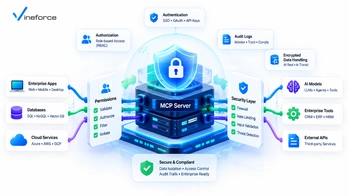
As enterprise organizations integrate Large Language Models (LLMs) into daily operations, security teams must evaluate the attack surface created by AI connections to backend databases, internal APIs, and cloud services. While the [Model Context Protocol (MCP)](https://modelcontextprotocol.io/) provides a powerful specification for context exchange, implementing a secure MCP server requires strict architecture and governance controls. > **Quick Summary:** [Model Context Protocol (MCP)](https://modelcontextprotocol.io/) is not inherently secure by default. Security is an architectural implementation responsibility. To build an enterprise-ready MCP server, organizations must layer Microsoft Entra ID authentication, tool-level authorization, least-privilege [SQL Server](https://www.microsoft.com/en-us/sql-server) database connections, parameterized input validation, Azure Key Vault secret isolation, and comprehensive audit logging around the MCP layer. --- Table of Contents - [The Threat Model for MCP Integrations](#the-threat-model-for-mcp-integrations) - [Crucial Clarification: Protocol vs. Infrastructure Security](#crucial-clarification-protocol-vs-infrastructure-security) - [Enterprise Security Pillars for MCP Servers](#enterprise-security-pillars-for-mcp-servers) - [1. User Authentication (Microsoft Entra ID)](#1-user-authentication-microsoft-entra-id) - [2. Tool-Level Authorization & Policy Enforcement](#2-tool-level-authorization--policy-enforcement) - [3. Least Privilege & Read-Only Data Layers](#3-least-privilege--read-only-data-layers) - [4. Parameterized Input Validation & Schema Sanitization](#4-parameterized-input-validation--schema-sanitization) - [5. Secret Management (Azure Key Vault)](#5-secret-management-azure-key-vault) - [6. Immutable Audit Logging & Observability](#6-immutable-audit-logging--observability) - [Zero Trust Network & Cloud Security Topology](#zero-trust-network--cloud-security-topology) - [Compliance Considerations (HIPAA, GDPR, SOC 2)](#compliance-considerations-hipaa-gdpr-soc-2) - [Frequently Asked Questions (FAQ)](#frequently-asked-questions-faq) - [Conclusion](#conclusion) --- The Threat Model for MCP Integrations Exposing enterprise backend systems to AI agents introduces novel vectors in threat modeling: ``` [ Attacker / Malicious Prompt ] | v (Indirect Prompt Injection) [ LLM Processing Engine ] | v (Generates Malicious Tool Arguments) +------------------------------------+ | Insecure MCP Server | | ❌ Unvalidated SQL parameter | ---> [ SQL Server ] (Data Exfiltration) | ❌ Unchecked API user identity | ---> [ REST API ] (Unauthorized Action) +------------------------------------+ ``` The primary security threats facing enterprise MCP deployments include: 1. **Indirect Prompt Injection**: Malicious instructions embedded in unstructured data (emails, PDFs, ticket bodies) tricking the LLM into invoking destructive MCP tools. 2. **Privilege Escalation**: An unprivileged end-user using an AI interface to run an MCP tool that accesses executive financial data or admin APIs. 3. **Data Exfiltration via Unbounded Queries**: Tools returning raw `SELECT *` datasets, exposing personal identifiable information (PII) or secrets to the LLM context buffer. To learn more about baseline protocol architecture before auditing security layers, review our introduction to [what Model Context Protocol (MCP) is](/what-is-model-context-protocol). --- Crucial Clarification: Protocol vs. Infrastructure Security > **IMPORTANT:** Never claim or assume that adopting MCP automatically makes your application secure, HIPAA compliant, or GDPR compliant. MCP is a communications protocol specification defining message schemas (JSON-RPC 2.0) for tools, prompts, and resources. **MCP does not contain built-in firewall rules, access control lists (ACLs), or database encryption.** Every security feature—from authentication tokens to database isolation—must be built around the MCP server by your software engineering and platform security teams. --- Enterprise Security Pillars for MCP Servers 1. User Authentication (Microsoft Entra ID) Remote MCP servers deployed as cloud microservices must require authenticated Bearer tokens (OAuth 2.0 / JWT) issued by enterprise identity providers like Microsoft Entra ID: ```csharp // ASP.NET Core Middleware validating Entra ID Jwt Bearer tokens public void ConfigureSecurity(IServiceCollection services, IConfiguration config) { services.AddAuthentication(JwtBearerDefaults.AuthenticationScheme) .AddMicrosoftIdentityWebApi(options => { config.Bind("AzureAd", options); options.Events = new JwtBearerEvents { OnTokenValidated = context => { // Inspect token claims and user Principal Name (UPN) return Task.CompletedTask; } }; }, options => { config.Bind("AzureAd", options); }); } ``` 2. Tool-Level Authorization & Policy Enforcement Do not assume that an authenticated user has permission to run every tool exposed by the MCP server. Evaluate claims dynamically per tool request: ```csharp public class PolicyAuthorizer { public bool IsAuthorized(ClaimsPrincipal user, string toolName) { return toolName switch { "get_financial_summary" => user.IsInRole("FinanceExecutive"), "search_knowledgebase" => user.Identity?.IsAuthenticated == true, "restart_app_service" => user.HasClaim("devops_admin", "true"), _ => false }; } } ``` 3. Least Privilege & Read-Only Data Layers Database connection strings consumed by your MCP server must utilize database roles restricted strictly to necessary tables. If the tool only generates reports, enforce `db_datareader` profiles or stored procedure execution rights only. For step-by-step SQL Server protection instructions, read our architectural guide on [connecting SQL Server to AI using MCP](/connect-sql-server-to-ai-using-mcp). 4. Parameterized Input Validation & Schema Sanitization Every MCP tool must define rigid JSON Schema parameter specifications. Before invoking C# or database handlers, sanitize string arguments against whitelists to prevent malicious SQL or script injections: ```csharp public record SearchInput(string Query, int MaxResults); public static class Validator { public static void Validate(SearchInput input) { if (input.MaxResults is < 1 or > 50) throw new ArgumentOutOfRangeException(nameof(input.MaxResults), "MaxResults must be between 1 and 50."); if (Regex.IsMatch(input.Query, @";|--|DROP|UPDATE|DELETE", RegexOptions.IgnoreCase)) throw new InvalidOperationException("Illegal characters detected in search query."); } } ``` 5. Secret Management (Azure Key Vault) Connection strings, API keys, and certificate fingerprints consumed by the MCP service must never be hardcoded or saved in deployment artifacts. Retrieve secrets securely from Azure Key Vault at runtime using Managed Identity credentials. To prevent common configuration pitfalls, explore our troubleshooting guide on [configuring keyVaultReferenceIdentity in Azure App Service](/2026-07-24-fix-keyVaultReferenceIdentity-azure-app-service). 6. Immutable Audit Logging & Observability Maintain detailed audit logs capturing every MCP JSON-RPC call. Log entries should record: - Invocation timestamp - User ID (UPN / Object ID) - Invoked tool name & raw input parameters - Tool execution status (Success / Forbidden / Exception) - Execution latency in milliseconds Stream audit logs directly to centralized SIEM platforms like Azure Sentinel or Application Insights. For more context on SaaS security controls, read our detailed analysis on [how advanced security measures safeguard SaaS applications](/how-advanced-security-measures-can-safeguard-your-saas-application). --- Zero Trust Network & Cloud Security Topology In enterprise cloud environments, isolate your MCP server within an Azure Virtual Network (VNet) using private endpoints: ``` [ User Device / Agent ] | v (HTTPS / Entra ID Authenticated Gateway) +-------------------------------------------------------------------+ | Azure Virtual Network (VNet) | | | | [ Application Gateway / Azure API Management ] | | | | | v (Private IP Endpoint) | | [ Azure Container Apps Subnet (MCP Server Microservice) ] | | | | | +--------------+--------------+ | | | (Private Link) | (Private Link) | | v v | | [ Azure Key Vault ] [ Azure SQL Database ] | +-------------------------------------------------------------------+ ``` By removing public IP endpoints from your MCP server and database instances, you eliminate unauthorized external network probes. --- Compliance Considerations (HIPAA, GDPR, SOC 2) When processing sensitive enterprise payloads (such as PHI or PII) through AI tools: - **Data Minimization**: Redact PII columns before returning JSON payloads to the MCP host. - **Data Residency**: Ensure your MCP server and Azure OpenAI endpoints are hosted within compliant Azure geographic regions. - **Encryption in Transit & at Rest**: Force TLS 1.3 for all MCP RPC transports and enable Transparent Data Encryption (TDE) on SQL Server. To review complete architecture and deployment options, explore [Vineforce AI Database Integration Solutions](https://www.vineforce.net/solutions/ai-database-integration-mcp/). --- Frequently Asked Questions (FAQ) Is Model Context Protocol (MCP) inherently secure out of the box? No. MCP is an open protocol specification for messaging. It does not enforce authentication, authorization, read-only permissions, or data encryption on its own. Enterprise security depends entirely on how the surrounding application, server handlers, identity model, and cloud infrastructure are designed. How do you authenticate users calling an MCP server? Remote MCP servers hosted in cloud environments should enforce OAuth 2.0 / OpenID Connect Bearer token authentication (such as Microsoft Entra ID JWTs) passed from the host application in request headers. What is tool-level authorization in an MCP server? Tool-level authorization evaluates the requesting user's identity claims against specific MCP tools before execution, ensuring users can only invoke tools matching their enterprise Role-Based Access Control (RBAC) rights. How can prompt injection attacks exploit insecure MCP tools? Prompt injection attacks attempt to manipulate an LLM into sending malicious parameters (such as SQL injection syntax or out-of-bounds identifiers) to MCP tools. MCP servers mitigate this by validating parameters against strict JSON schemas and using parameterized queries. --- Conclusion Building a secure MCP server for enterprise AI applications requires a defense-in-depth approach. By integrating Microsoft Entra ID authentication, strict tool authorization, read-only database connections, Azure Key Vault secret management, and VNet isolation, enterprises can deploy powerful AI capabilities with confidence. Need help connecting your existing application or business data with AI? [Vineforce](https://www.vineforce.net/solutions/ai-database-integration-mcp/) can help design and implement a secure MCP architecture around your existing databases, APIs, authentication, authorization, and business rules.

What Is Model Context Protocol (MCP)? A Business & Developer Guide

What Is Model Context Protocol (MCP)? A Business & Developer Guide

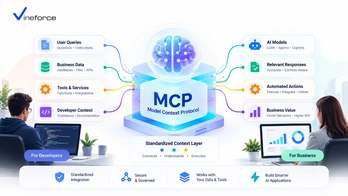
Large Language Models (LLMs) have transformed how organizations interact with software. However, connecting generative AI models to proprietary enterprise data, [Microsoft SQL Server](https://www.microsoft.com/en-us/sql-server) databases, and internal REST APIs has historically required brittle custom glue code, fragmented function-calling definitions, and security workarounds. The [Model Context Protocol (MCP)](https://modelcontextprotocol.io/) changes this paradigm by introducing an open standard for AI data integration. > **Quick Summary:** [Model Context Protocol (MCP)](https://modelcontextprotocol.io/) is an open specification that acts as a universal adapter between AI applications (LLM clients) and enterprise systems (servers). By standardizing how AI tools, resources, and prompts are exposed, MCP allows organizations to safely connect databases, APIs, and business workflows to AI assistants without rewriting custom integration layers for every new LLM provider. --- Table of Contents - [The Need for an Open AI Integration Standard](#the-need-for-an-open-ai-integration-standard) - [What Is Model Context Protocol (MCP)?](#what-is-model-context-protocol-mcp) - [Core Architecture: Clients, Servers, and Hosts](#core-architecture-clients-servers-and-hosts) - [1. MCP Host & Client](#1-mcp-host--client) - [2. MCP Server](#2-mcp-server) - [3. Primitive Constructs: Tools, Resources, and Prompts](#3-primitive-constructs-tools-resources-and-prompts) - [How AI Applications Interact with MCP Servers](#how-ai-applications-interact-with-mcp-servers) - [Key Business Use Cases for MCP](#key-business-use-cases-for-mcp) - [Integrating Databases and REST APIs via MCP](#integrating-databases-and-rest-apis-via-mcp) - [Enterprise Security and Governance Considerations](#enterprise-security-and-governance-considerations) - [Enterprise Scenario: .NET and Azure Integration](#enterprise-scenario-net-and-azure-integration) - [When Should Your Company Adopt MCP?](#when-should-your-company-adopt-mcp) - [Frequently Asked Questions (FAQ)](#frequently-asked-questions-faq) - [Conclusion](#conclusion) --- The Need for an Open AI Integration Standard Before MCP emerged, connecting an LLM to enterprise business data meant building bespoke integrations for every combination of AI host and database endpoint: ``` [ AI Model / Host ] ---> ( Custom Wrapper ) ---> [ SQL Server ] [ Custom Chatbot ] ---> ( Proprietary Tool ) ---> [ REST API ] [ IDE Assistant ] ---> ( Hardcoded Client ) ---> [ ERP System ] ``` This fragmented architecture created several friction points for CTOs, IT managers, and enterprise software architects: 1. **Vendor Lock-in**: Function definitions tailored for OpenAI's API could not easily be reused when switching to Anthropic Claude, Azure OpenAI, or local open-source models. 2. **Duplicate Code**: Teams spent months rewriting data fetchers, JSON schema formatters, and parameter mappers for each product interface. 3. **Security Risks**: Developers frequently exposed raw SQL access or unmonitored API endpoints directly to LLMs, risking prompt injection and data leaks. MCP solves these challenges by establishing a standard client-server protocol over JSON-RPC 2.0 as outlined in the [official Model Context Protocol documentation](https://modelcontextprotocol.io/). --- What Is Model Context Protocol (MCP)? **Model Context Protocol (MCP)** is an open-source protocol spec designed to give AI assistants structured, controlled access to content, tools, and capabilities residing in host environments. Much like HTTP provided a universal protocol for the World Wide Web and Language Server Protocol (LSP) standardized IDE code intelligence, MCP provides a universal specification for AI context exchange: ``` +------------------+ JSON-RPC 2.0 +------------------+ | MCP Host / | <========================> | MCP Server | | AI Client | (stdio / HTTP-SSE / WS) | (Data & API Gate)| +------------------+ +------------------+ | | v v [ User Query ] [ SQL DB / APIs / ERP ] ``` --- Core Architecture: Clients, Servers, and Hosts MCP operates on a client-server paradigm, separating the AI reasoning engine from the underlying data store and business rules. 1. MCP Host & Client The **MCP Host** is the runtime application that orchestrates the user interaction and LLM queries (e.g., Claude Desktop, custom enterprise AI portals, VS Code AI extensions, or custom web apps). The host initializes an **MCP Client**, establishing a bidirectional channel to one or more MCP servers. 2. MCP Server An **MCP Server** is a lightweight application component or microservice that exposes capabilities to the MCP client. The MCP server does *not* contain the LLM engine itself; instead, it exposes defined capability primitives that the LLM can call upon. 3. Primitive Constructs: Tools, Resources, and Prompts The protocol standardizes three primary types of server capabilities: - **Tools**: Executable functions that perform actions or retrieve dynamically computed data (e.g., `execute_sql_query`, `fetch_customer_record`, `send_notification`). - **Resources**: File-like data streams or static contextual payloads read by the client (e.g., schema documentation, system log outputs, tenant metadata). - **Prompts**: Reusable prompt templates exposed by the server to guide user intent into pre-structured workflow pipelines. --- How AI Applications Interact with MCP Servers When a user asks a business question—such as *"What were total sales for Account X last quarter?"*—the runtime exchange follows a structured sequence: ``` [User] -> (Query) -> [AI Application (MCP Host)] | v 1. Requests list of tools (tools/list) [MCP Server] | v 2. Returns JSON Schema tool definitions [AI Application] | v 3. Sends user query + tool schemas to LLM [LLM] | v 4. Decides to invoke "get_quarterly_sales" [AI Application] | v 5. Executes tool call (tools/call) [MCP Server] ---> [Enterprise SQL DB / API] | v 6. Returns structured JSON result payload [AI Application] | v 7. Sends result to LLM for final synthesis [LLM] -> (Natural Language Response) -> [User] ``` At no point does the LLM talk directly to your database. Every interaction passes through controlled MCP tools bounded by application logic. --- Key Business Use Cases for MCP Enterprise organizations are utilizing MCP to solve critical data integration challenges: 1. **Context-Aware Business Intelligence**: Connecting executive dashboards to live SQL databases via restricted MCP query tools, allowing non-technical managers to ask natural-language business questions without risk. 2. **Automated SaaS Customer Support**: Exposing ticketing systems, user permissions, and knowledge bases to support bots safely. 3. **Legacy ERP & CRM Modernization**: Wrapping legacy SOAP/REST services or legacy SQL databases in a modern .NET MCP server, granting AI capability without requiring total application re-architecture. 4. **Developer & DevOps Tooling**: Letting engineering teams inspect cloud diagnostic logs, Azure App Service status, and CI/CD pipelines through natural language. --- Integrating Databases and REST APIs via MCP Connecting a relational database (like SQL Server or PostgreSQL) or a REST API to an MCP server involves wrapping data access routines inside tool schemas: ```csharp // Conceptual C# MCP Tool Definition snippet [McpTool("get_customer_orders", "Retrieves recent orders for a given Customer ID")] public async Task<OrderSummaryResponse> GetCustomerOrdersAsync( [McpParameter("Customer ID string")] string customerId, [McpParameter("Limit count")] int limit = 10) { // Validate request and execute parameterized query against SQL Server return await _orderService.GetOrdersByCustomerAsync(customerId, limit); } ``` By encapsulating queries within strongly typed application services, you eliminate dangerous dynamic string concatenations while retaining natural-language accessibility. If you are exploring how to integrate enterprise data layers, explore our detailed guide on how [Vineforce AI Database Integration Solutions](https://www.vineforce.net/solutions/ai-database-integration-mcp/) help companies modernize their data accessibility. --- Enterprise Security and Governance Considerations A common misconception is that implementing MCP automatically renders an AI application secure. > **CRITICAL SECURITY PRINCIPLE:** MCP is an open transport protocol specification. It does **not** inherently enforce read-only execution, user authorization, tenant isolation, or regulatory compliance (such as HIPAA or GDPR). Security must be implemented by the host application, the MCP server logic, and the underlying cloud infrastructure. When designing enterprise MCP architectures, consider these security boundaries: - **Identity Propagation**: Ensure user credentials (e.g., OAuth 2.0 / Entra ID JWT tokens) are passed from the host to the MCP server so business-layer permission checks can be evaluated. - **Least Privilege Connections**: Ensure database connection strings used by MCP servers employ read-only service accounts with constrained schema permissions. - **Tool Whitelisting & Input Validation**: Sanitize parameters thoroughly to prevent prompt injection attacks from injecting arbitrary SQL commands into parameter fields. - **Audit Trails**: Log every tool invocation, including raw arguments and caller identities, to central logging hubs like Azure Monitor or Application Insights. For more insights on securing enterprise software architectures, review our analysis on [how advanced security measures safeguard SaaS applications](/how-advanced-security-measures-can-safeguard-your-saas-application). --- Enterprise Scenario: .NET and Azure Integration In Microsoft-centric enterprise ecosystems, MCP servers fit cleanly into existing ASP.NET Core and Azure architectures: ``` [ Azure OpenAI Service ] ^ | (HTTPS / REST) v [ Custom Web App / Agent Host ] | | (JSON-RPC over HTTP-SSE / gRPC) v [ ASP.NET Core MCP Server ] ---> [ Azure Key Vault (Secrets) ] | ---> [ Microsoft Entra ID (Auth) ] v [ Azure SQL Database ] ``` Using .NET 9 features like native Native AOT or high-throughput minimal APIs, enterprise developers can build high-performance MCP microservices that run seamlessly inside Azure Container Apps or Azure App Service. To discover how the latest framework advances impact enterprise development, read our guide on [what's new in .NET 9](/whats-new-in-net-9-faster-safer-smarter-features). --- When Should Your Company Adopt MCP? Your organization should evaluate Model Context Protocol if: - You plan to build AI tools or internal assistants that interact with proprietary business data. - You operate a multi-tenant SaaS application and want to introduce AI capabilities without violating tenant boundaries. - You maintain multiple AI interfaces (web portals, Slack bots, IDE plugins) and want a unified integration backend. - You need clear audit trails, RBAC enforcement, and strict security controls around LLM tool executions. To learn how to connect your specific SQL database architectures to AI, read our deep-dive guide on [how to connect SQL Server to AI using MCP](/connect-sql-server-to-ai-using-mcp). --- Frequently Asked Questions (FAQ) What is Model Context Protocol (MCP)? Model Context Protocol (MCP) is an open standard designed by Anthropic that provides a uniform interface for Large Language Models (LLMs) and AI assistants to securely connect to external tools, data sources, and enterprise APIs. Why is MCP better than custom direct LLM integrations? Custom direct integrations force developers to write proprietary function-calling wrappers for every LLM host and database combination. MCP replaces n-to-m integration pipelines with a single standardized protocol, enabling reuse across multiple AI clients. Does Model Context Protocol (MCP) handle authentication and security out of the box? No. MCP is an open transport protocol spec. Security features such as user authentication, role-based access control, least-privilege database credentials, and audit logging must be implemented by the host application and infrastructure surrounding the MCP server. How does MCP integrate with .NET and Azure ecosystems? An MCP server can be implemented as an ASP.NET Core web service, deployed on Azure App Service or Azure Container Apps, using Managed Identities and Azure Key Vault to securely query Azure SQL databases or call internal APIs. --- Conclusion Model Context Protocol (MCP) bridges the gap between raw LLM intelligence and static enterprise data systems. By standardizing the interface between AI hosts and backend services, MCP accelerates AI deployment while providing clear architectural boundaries for security and governance. Need help connecting your existing application or business data with AI? [Vineforce](https://www.vineforce.net/solutions/ai-database-integration-mcp/) can help design and implement a secure MCP architecture around your existing databases, APIs, authentication, authorization, and business rules.