Showing posts from SQL Server category

How to Connect SQL Server to AI Using Model Context Protocol (MCP)

How to Connect SQL Server to AI Using Model Context Protocol (MCP)

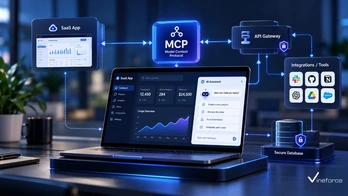
Connecting enterprise data stored in [Microsoft SQL Server](https://www.microsoft.com/en-us/sql-server) or Azure SQL Database to artificial intelligence assistants promises revolutionary business intelligence capabilities. However, allowing a Large Language Model (LLM) to interface with relational databases introduces major security and operational risks if done improperly. The [Model Context Protocol (MCP)](https://modelcontextprotocol.io/) provides a secure blueprint for bridging SQL databases and AI engines. > **Quick Summary:** Directly connecting an LLM to [SQL Server](https://www.microsoft.com/en-us/sql-server) with raw execution permissions exposes your database to prompt injection, data theft, and accidental schema destruction. The recommended enterprise pattern uses an [MCP server](https://modelcontextprotocol.io/) layer that exposes tightly scoped, parameterized tools backed by read-only database connections, strong authentication, and centralized audit logging. --- Table of Contents - [The Risks of Unrestricted LLM-to-SQL Connections](#the-risks-of-unrestricted-llm-to-sql-connections) - [Recommended Architecture: The MCP Buffer Pattern](#recommended-architecture-the-mcp-buffer-pattern) - [Core Security Controls for SQL Server MCP Integrations](#core-security-controls-for-sql-server-mcp-integrations) - [1. Least Privilege & Read-Only Credentials](#1-least-privilege--read-only-credentials) - [2. Approved Tool Whitelisting vs. Raw SQL Execution](#2-approved-tool-whitelisting-vs-raw-sql-execution) - [3. Parameterized Query Enforcement](#3-parameterized-query-enforcement) - [4. Authentication & Authorization Propagation](#4-authentication--authorization-propagation) - [Step-by-Step Architecture Implementation](#step-by-step-architecture-implementation) - [Step 1: Define Database Security Roles](#step-1-define-database-security-roles) - [Step 2: Build Parameterized MCP Tools in .NET](#step-2-build-parameterized-mcp-tools-in-net) - [Step 3: Implement Centralized Logging & Auditing](#step-3-implement-centralized-logging--auditing) - [Azure SQL & Azure OpenAI Integration Scenarios](#azure-sql--azure-openai-integration-scenarios) - [Frequently Asked Questions (FAQ)](#frequently-asked-questions-faq) - [Conclusion](#conclusion) --- The Risks of Unrestricted LLM-to-SQL Connections When organizations first attempt to connect SQL Server to AI, developers are often tempted to build a tool that accepts dynamic SQL strings generated directly by the LLM: ``` [ Unsafe Flow ] User Query -> LLM -> Generates "SELECT * FROM Users; DROP TABLE Logs;" -> Dynamic Execution -> DB Crash ``` This naïve approach introduces severe vulnerabilities: 1. **Prompt Injection & SQL Injection**: An attacker manipulating the chat prompt can trick the LLM into generating destructive DDL statements (`DROP TABLE`, `ALTER TABLE`) or unauthorized DML queries (`UPDATE`, `DELETE`). 2. **Exfiltration of Sensitive Columns**: The LLM might generate a `SELECT *` query on customer tables, retrieving password hashes, PII, or financial records that the end-user should not see. 3. **Denial of Service (Resource Exhaustion)**: Unbounded queries joining multi-million-row tables without indexes can lock SQL Server tables and consume server memory/CPU. To understand foundational concepts before designing database bridges, review our guide on [what Model Context Protocol (MCP) is and how it works](/what-is-model-context-protocol). --- Recommended Architecture: The MCP Buffer Pattern To protect production SQL Server instances, enterprises must place a controlled application and access layer between the AI application and the database: ``` +-------------------+ | AI Application | (e.g., Enterprise Chat Assistant) +-------------------+ | | JSON-RPC (tools/call) v +-------------------+ | MCP Server | (ASP.NET Core / .NET 9 Service) +-------------------+ | +---> [ Authenticator / Identity Provider (Entra ID) ] +---> [ Audit Log Stream (Azure Monitor / Serilog) ] | v (Strict Tool Execution via Approved Service Layer) +-------------------+ | Application Layer | (EF Core / Dapper Parameterized Handlers) +-------------------+ | v (Read-Only Managed Identity Connection) +-------------------+ | SQL Server / | (Azure SQL Database with DB-level RBAC) | Azure SQL DB | +-------------------+ ``` In this architecture, the LLM **never** sees or writes SQL syntax directly. Instead, the LLM selects from a predefined catalog of structured MCP tools exposed by the server. --- Core Security Controls for SQL Server MCP Integrations 1. Least Privilege & Read-Only Credentials The MCP server must connect to SQL Server using a dedicated service account or Azure Entra ID Managed Identity assigned exclusively to `db_datareader` roles or specific `EXECUTE` permissions on approved stored procedures. Under no circumstances should the connection string use `sa` or `db_owner` accounts. 2. Approved Tool Whitelisting vs. Raw SQL Execution Rather than offering a single generic `execute_sql` tool, expose domain-specific tools designed around concrete business functions: - ❌ `execute_query(sql_string)` — Dangerous and unmonitored. - ✅ `get_product_inventory(sku, warehouse_id)` — Safe, bounded, and parameterized. - ✅ `search_customer_orders(customer_id, start_date, end_date)` — Constrained to customer boundaries. 3. Parameterized Query Enforcement All database calls executed inside MCP tool handlers must utilize parameterized queries via Object-Relational Mappers (ORMs) like Entity Framework Core or micro-ORMs like Dapper: ```csharp // Safe Parameterized Query Execution inside a .NET MCP Tool public async Task<IEnumerable<SalesReport>> GetSalesReportAsync(string region, int year) { const string sql = @" SELECT Region, TotalSales, ReportYear FROM Sales.RegionalSummaries WHERE Region = @Region AND ReportYear = @Year"; using var connection = new SqlConnection(_connectionString); return await connection.QueryAsync<SalesReport>(sql, new { Region = region, Year = year }); } ``` 4. Authentication & Authorization Propagation The host application invoking the MCP server must pass the requesting user's security context (e.g., Bearer JWT token). The MCP server verifies user claims before allowing tool execution. Learn more about enterprise security standards in our article on [how advanced security measures safeguard SaaS applications](/how-advanced-security-measures-can-safeguard-your-saas-application). --- Step-by-Step Architecture Implementation Step 1: Define Database Security Roles On your SQL Server or Azure SQL Database instance, create a dedicated database user for the MCP service: ```sql -- Create constrained login and user for MCP Service CREATE USER [mcp-service-identity] FROM EXTERNAL PROVIDER; -- For Azure Entra ID -- Alternatively: CREATE USER [mcp_db_user] WITH PASSWORD = '...'; -- Grant read-only access to specific schemas GRANT SELECT ON SCHEMA::Sales TO [mcp-service-identity]; GRANT EXECUTE ON SCHEMA::Reporting TO [mcp-service-identity]; DENY SELECT ON SCHEMA::HR TO [mcp-service-identity]; ``` Step 2: Build Parameterized MCP Tools in .NET Using .NET 9 minimal APIs or an ASP.NET Core web service, structure your tool definitions cleanly: ```csharp public record OrderQueryInput(string CustomerId, int Top = 5); public class SqlMcpOrderTools { private readonly IOrderRepository _repository; public SqlMcpOrderTools(IOrderRepository repository) { _repository = repository; } [McpTool("get_customer_recent_orders", "Fetches top recent orders for a specified customer ID.")] public async Task<IResult> GetRecentOrdersAsync(OrderQueryInput input) { if (string.IsNullOrWhiteSpace(input.CustomerId)) { return Results.BadRequest("Customer ID is required."); } var orders = await _repository.GetRecentOrdersAsync(input.CustomerId, Math.Min(input.Top, 20)); return Results.Ok(orders); } } ``` Step 3: Implement Centralized Logging & Auditing Every tool invocation should generate an audit log capturing caller claims, tool names, parameters, execution latency, and row count returns: ```json { "Timestamp": "2026-09-11T10:30:00Z", "Event": "MCP_Tool_Executed", "ToolName": "get_customer_recent_orders", "CallerIdentity": "[email protected]", "Parameters": { "CustomerId": "CUST-9941", "Top": 5 }, "RowsReturned": 3, "DurationMs": 42 } ``` --- Azure SQL & Azure OpenAI Integration Scenarios When operating within Microsoft Azure, the SQL Server to AI pipeline can be fully secured without persistent DB credentials stored in config files: ``` [ User Browser ] | v (HTTPS + OAuth 2.0 / Entra ID) [ Azure App Service (Agent Front) ] | v (Managed Identity) [ Azure Container Apps (MCP Service) ] | +---> Fetch connection string secret from [ Azure Key Vault ] | v (Passwordless Entra ID Token) [ Azure SQL Database ] ``` By leveraging Managed Identity authentication, your MCP service requests short-lived Entra ID access tokens dynamically, eliminating database password rotation overhead. For steps on establishing cloud infrastructure pipelines, see our detailed guide on [setting up Azure CI/CD pipelines using Visual Studio](/setup-azure-ci-cd-pipelines-using-visual-studio). For comprehensive database integration projects across enterprise environments, explore [Vineforce AI Database Integration Solutions](https://www.vineforce.net/solutions/ai-database-integration-mcp/). --- Frequently Asked Questions (FAQ) Why is directly giving an LLM unrestricted SQL connection details dangerous? Giving an LLM direct access or dynamic SQL execution capabilities creates severe vulnerabilities, including SQL injection via prompt manipulation, accidental schema modifications (DROP/DELETE), unauthorized data exposure across security boundaries, and database resource exhaustion. How does Model Context Protocol (MCP) protect SQL Server data? MCP forces AI applications to interact with SQL Server exclusively through pre-approved, parameterized tool definitions. The MCP server acts as an isolation layer enforcing read-only database connections, user authorization, and explicit query bounds. Can I connect Azure SQL Database to an AI assistant using MCP? Yes. Azure SQL Database connects seamlessly to a .NET MCP server hosted on Azure App Service or Container Apps, utilizing Azure Entra ID Managed Identities for passwordless authentication and Azure Key Vault for secret management. Should MCP tools allow execution of raw SQL SELECT statements? In enterprise settings, allowing raw dynamic SQL execution by LLMs is strongly discouraged. Best practice is exposing domain-specific parameterized tools (e.g. `GetCustomerMonthlySummary`) that invoke stored procedures or strongly typed EF Core queries. --- Conclusion Connecting SQL Server or Azure SQL to AI applications does not require exposing your core database to security risks. By implementing a Model Context Protocol server equipped with read-only connection profiles, whitelisted parameterized tools, and strong identity verification, enterprises can unlock natural-language data access safely. Need help connecting your existing application or business data with AI? [Vineforce](https://www.vineforce.net/solutions/ai-database-integration-mcp/) can help design and implement a secure MCP architecture around your existing databases, APIs, authentication, authorization, and business rules.