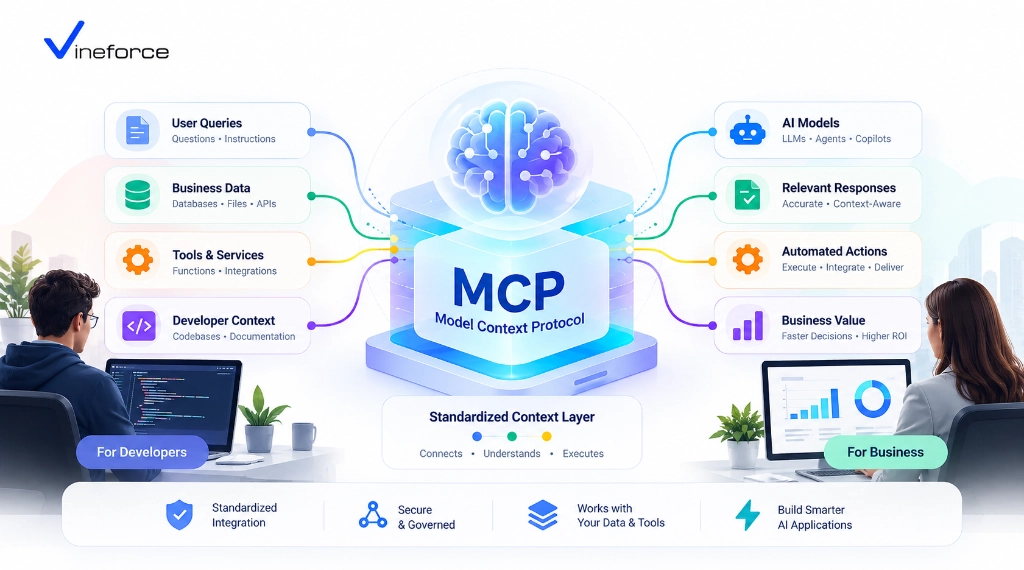
What Is Model Context Protocol (MCP)? A Business & Developer Guide
- Harsh Gupta
- 20 Sep, 2026
- 06 Mins read
- AI , Architecture , Enterprise
If you’ve tried connecting an LLM to real business data, you already know the pain: one custom wrapper for OpenAI function calling, a different one for the internal SQL Server, another brittle shim when the team wanted to try Anthropic Claude. Every combination meant more code, more maintenance, and more surface area for security issues. The Model Context Protocol (MCP) was built to replace that entire class of problems with a single, open standard.
Quick Summary: Model Context Protocol (MCP) is an open specification that acts as a universal adapter between AI applications (LLM clients) and enterprise systems (servers). By standardizing how AI tools, resources, and prompts are exposed, MCP allows organizations to safely connect databases, APIs, and business workflows to AI assistants without rewriting custom integration layers for every new LLM provider.
The Need for an Open AI Integration Standard
Before MCP, connecting an LLM to enterprise business data meant building separate integrations for every combination of AI host and data endpoint:
[ AI Model / Host ]  --->  ( Custom Wrapper )  --->  [ SQL Server ]
[ Custom Chatbot  ]  --->  ( Proprietary Tool ) --->  [ REST API ]
[ IDE Assistant   ]  --->  ( Hardcoded Client ) --->  [ ERP System ]
This fragmented approach created real problems for engineering teams:
- Vendor lock-in: Function definitions written for OpenAI’s API were not reusable when the team switched to Azure OpenAI or a local open-source model. Switching models meant rewriting integration code.
- Duplicate work: Engineers spent months writing JSON schema formatters, parameter mappers, and data fetchers — the same logic, rewritten three different ways for three different AI surfaces.
- Security gaps: When every integration is bespoke, security controls get inconsistent. Raw SQL connections, unmonitored API endpoints, and ad-hoc access checks became the norm.
MCP solves these by establishing a standard client-server protocol over JSON-RPC 2.0, as defined in the official Model Context Protocol documentation.
What Is Model Context Protocol (MCP)?
Model Context Protocol (MCP) is an open-source protocol spec that gives AI assistants structured, controlled access to content, tools, and capabilities running in host environments.
The simplest analogy: HTTP gave us a universal protocol for the Web. LSP (Language Server Protocol) standardized IDE code intelligence across editors. MCP does the same thing for AI context exchange — one protocol, any compliant client and server:
+------------------+         JSON-RPC 2.0         +------------------+
|    MCP Host /    |  <========================>  |    MCP Server    |
|    AI Client     |   (stdio / HTTP-SSE / WS)    | (Data & API Gate)|
+------------------+                              +------------------+
         |                                                 |
         v                                                 v
  [ User Query ]                                 [ SQL DB / APIs / ERP ]
Core Architecture: Clients, Servers, and Hosts
MCP separates the AI reasoning engine from the data store and business rules. That separation is the whole point.
1. MCP Host & Client
The MCP Host is the runtime that orchestrates user interaction and LLM queries — Claude Desktop, a custom enterprise AI portal, a VS Code extension, or a web app built in-house. The host initializes an MCP Client, establishing a bidirectional channel to one or more MCP servers.
2. MCP Server
An MCP Server is a lightweight application component or microservice that exposes capabilities to the MCP client. Critically, the MCP server does not contain the LLM engine itself. It exposes defined capability primitives that the LLM can call upon — nothing more.
3. Primitive Constructs: Tools, Resources, and Prompts
The protocol defines three types of server capabilities:
- Tools: Executable functions that perform actions or retrieve dynamically computed data —
execute_sql_query,fetch_customer_record,send_notification. - Resources: File-like data streams or static contextual payloads read by the client — schema documentation, system log outputs, tenant metadata.
- Prompts: Reusable prompt templates exposed by the server to guide user intent into pre-structured workflow pipelines.
How AI Applications Interact with MCP Servers
When a user asks a business question — say, “What were total sales for Account X last quarter?” — the exchange follows a structured sequence:
[User] -> (Query) -> [AI Application (MCP Host)]
                           |
                           v  1. Requests list of tools (tools/list)
                     [MCP Server]
                           |
                           v  2. Returns JSON Schema tool definitions
                     [AI Application]
                           |
                           v  3. Sends user query + tool schemas to LLM
                         [LLM]
                           |
                           v  4. Decides to invoke "get_quarterly_sales"
                     [AI Application]
                           |
                           v  5. Executes tool call (tools/call)
                     [MCP Server] ---> [Enterprise SQL DB / API]
                           |
                           v  6. Returns structured JSON result payload
                     [AI Application]
                           |
                           v  7. Sends result to LLM for final synthesis
                         [LLM] -> (Natural Language Response) -> [User]
At no point does the LLM talk directly to your database. Every interaction passes through controlled MCP tools bounded by application logic.
Key Business Use Cases for MCP
Here’s where MCP is actually being used in production today:
- Context-Aware Business Intelligence: Connecting executive dashboards to live SQL databases via restricted MCP query tools, so non-technical managers can ask natural-language business questions without risk to the underlying data.
- Automated SaaS Customer Support: Exposing ticketing systems, user permissions, and knowledge bases to support bots in a controlled, auditable way.
- Legacy ERP & CRM Modernization: Wrapping legacy SOAP/REST services or older SQL databases in a modern .NET MCP server — AI capability without total re-architecture.
- Developer & DevOps Tooling: Letting engineering teams inspect cloud diagnostic logs, Azure App Service status, and CI/CD pipeline state through natural language queries.
Integrating Databases and REST APIs via MCP
Connecting a relational database like SQL Server or PostgreSQL to an MCP server means wrapping your data access routines inside typed tool schemas:
// Conceptual C# MCP Tool Definition snippet
[McpTool("get_customer_orders", "Retrieves recent orders for a given Customer ID")]
public async Task<OrderSummaryResponse> GetCustomerOrdersAsync(
    [McpParameter("Customer ID string")] string customerId,
    [McpParameter("Limit count")] int limit = 10)
{
    // Validate request and execute parameterized query against SQL Server
    return await _orderService.GetOrdersByCustomerAsync(customerId, limit);
}
By wrapping queries in strongly typed application services, you eliminate dynamic string concatenations while retaining natural-language accessibility. If you’re working on this layer, our detailed guide on how Vineforce AI Database Integration Solutions help companies modernize their data accessibility is worth a read.
Enterprise Security and Governance Considerations
A common mistake is assuming that implementing MCP automatically makes an AI application secure.
CRITICAL SECURITY PRINCIPLE: MCP is an open transport protocol specification. It does not inherently enforce read-only execution, user authorization, tenant isolation, or regulatory compliance (such as HIPAA or GDPR). Security must be implemented by the host application, the MCP server logic, and the underlying cloud infrastructure.
When designing enterprise MCP architectures, these boundaries matter most:
- Identity Propagation: User credentials (OAuth 2.0 / Entra ID JWT tokens) need to flow from the host to the MCP server so business-layer permission checks can fire.
- Least Privilege Connections: Database connections used by MCP servers should use read-only service accounts with constrained schema permissions — not
saordb_owner. - Tool Whitelisting & Input Validation: Sanitize parameters thoroughly. Prompt injection attacks work by getting malicious SQL or script content into tool parameter fields.
- Audit Trails: Log every tool invocation — raw arguments, caller identities — to central hubs like Azure Monitor or Application Insights.
For a deeper look at securing enterprise software, our analysis of how advanced security measures safeguard SaaS applications covers complementary ground.
Enterprise Scenario: .NET and Azure Integration
In Microsoft-centric stacks, MCP servers fit cleanly into existing ASP.NET Core and Azure architectures:
[ Azure OpenAI Service ]
           ^
           |  (HTTPS / REST)
           v
[ Custom Web App / Agent Host ]
           |
           |  (JSON-RPC over HTTP-SSE / gRPC)
           v
[ ASP.NET Core MCP Server ] ---> [ Azure Key Vault (Secrets) ]
           |                 ---> [ Microsoft Entra ID (Auth) ]
           v
  [ Azure SQL Database ]
.NET 9 features like Native AOT and high-throughput minimal APIs make it practical to build high-performance MCP microservices that run inside Azure Container Apps or Azure App Service without adding significant overhead. If you want to see what’s available in the latest framework version, our guide on what’s new in .NET 9 is a good starting point.
When Should Your Company Adopt MCP?
It’s worth evaluating MCP if your organization fits any of these scenarios:
- You’re building AI tools or internal assistants that need to read from or act on proprietary business data.
- You run a multi-tenant SaaS application and want to add AI features without crossing tenant boundaries.
- You have multiple AI surfaces — a web portal, a Slack bot, an IDE plugin — and you want them all backed by the same integration layer.
- You need clear audit trails, RBAC enforcement, and tight security controls around what an LLM can actually do.
For a hands-on look at connecting relational databases to AI safely, our deep-dive on how to connect SQL Server to AI using MCP walks through the architecture in detail.
Frequently Asked Questions (FAQ)
What is Model Context Protocol (MCP)?
Model Context Protocol (MCP) is an open standard designed by Anthropic that provides a uniform interface for Large Language Models (LLMs) and AI assistants to securely connect to external tools, data sources, and enterprise APIs.
Why is MCP better than custom direct LLM integrations?
Custom direct integrations force developers to write proprietary function-calling wrappers for every LLM host and database combination. MCP replaces n-to-m integration pipelines with a single standardized protocol, enabling reuse across multiple AI clients.
Does Model Context Protocol (MCP) handle authentication and security out of the box?
No. MCP is an open transport protocol spec. Security features such as user authentication, role-based access control, least-privilege database credentials, and audit logging must be implemented by the host application and infrastructure surrounding the MCP server.
How does MCP integrate with .NET and Azure ecosystems?
An MCP server can be implemented as an ASP.NET Core web service, deployed on Azure App Service or Azure Container Apps, using Managed Identities and Azure Key Vault to securely query Azure SQL databases or call internal APIs.
Conclusion
The pattern MCP addresses is not new — every team building AI integrations has hit the same wall of bespoke glue code. What MCP gives you is a well-defined boundary between the AI reasoning layer and your actual systems, which makes the whole thing easier to test, audit, and evolve as models improve.
If you need help designing an MCP architecture around your existing databases, APIs, and authentication setup, Vineforce has built this stack in production and can help you avoid the common pitfalls.