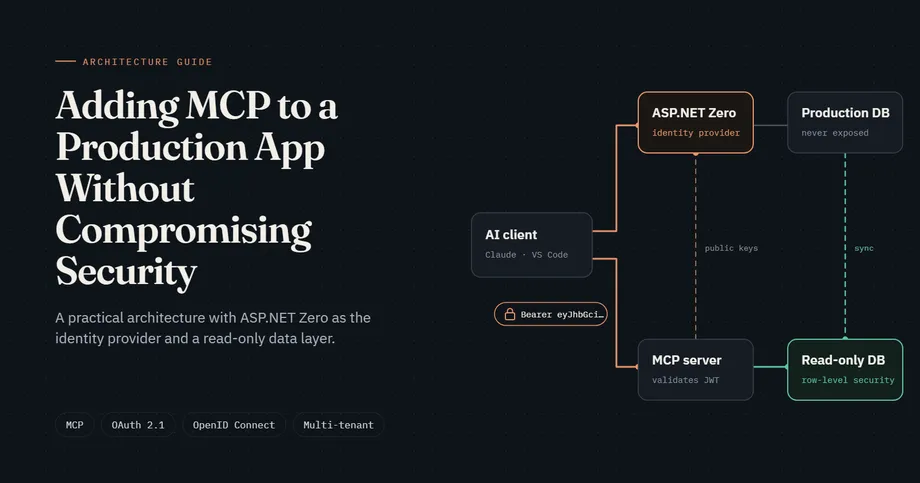
Adding MCP to a Production App Without Compromising Security: A Practical Architecture (with ASP.NET Zero as the Example)
- Harsh Gupta
- 29 Sep, 2026
- 14 Mins read
- Architecture , AI , Security
Connecting Large Language Models (LLMs) to enterprise applications is no longer confined to custom chat widgets embedded in a web dashboard. Engineering teams, product managers, and enterprise users want AI assistants integrated directly into their primary workstations: Claude Desktop, Cursor, VS Code, and autonomous AI agents. The Model Context Protocol (MCP) has quickly established itself as the open standard for bridging these AI clients to backend tools, business workflows, and live data.
However, adding an MCP server to an established multi-tenant application introduces serious architectural and security risks. Wiring AI tools directly into your primary transactional database creates query denial-of-service risks, bypasses your existing identity boundaries, and exposes your tenants to cross-tenant data exfiltration through prompt manipulation.
Quick Summary: Exposing an existing production application to AI assistants via Model Context Protocol (MCP) requires treating the MCP server as an OAuth 2.1 resource server that delegates authentication to your existing identity provider (such as ASP.NET Zero via OpenIddict). By validating short-lived JWT tokens locally via cached JWKS public keys, resolving tenant context strictly from claims, and directing all tool queries to an isolated read-only data replica with Row-Level Security (RLS), teams achieve enterprise-grade AI integration without risking production stability or customer data isolation.
Table of Contents
Open Table of Contents
- The Risk of Connecting AI Directly to Production Data
- How MCP Authorization Works
- The Recommended Reference Architecture
- Why Reuse the Existing App for Authentication?
- Authentication Strategy: Full OAuth 2.1 (OpenIddict) vs. Shared Symmetric JWT
- Step-by-Step Implementation Guide
- Token Validation Deep Dive: Local JWT Validation vs. Remote Introspection
- Production Security Checklist
- Common Pitfalls to Avoid
- Adapting the Pattern to Other Technology Stacks
- Related Engineering Resources
- Frequently Asked Questions (FAQ)
- Why shouldn’t an MCP server connect directly to the primary production database?
- How does an MCP client authenticate against an existing application without a separate user store?
- Why should an MCP server validate JWTs locally instead of using token introspection?
- How do you enforce multi-tenant isolation when querying a replica database without framework filters?
- Can this architecture be applied to stacks other than ASP.NET Zero and SQL Server?
- Conclusion
The Risk of Connecting AI Directly to Production Data
When engineers build an initial prototype with MCP, the natural temptation is to create an MCP service that connects directly to the core application database with full read/write credentials:
[ AI Assistant / LLM ] ──► [ Unauthenticated MCP Server ] ──► [ Primary Production DB (OLTP) ]In a production environment, this approach creates critical vulnerabilities:
- Unpredictable Analytical Load on Transactional Databases: LLM-generated tool requests often run complex aggregations or broad filters. Firing these queries directly against an active Online Transaction Processing (OLTP) database locks tables, spikes CPU utilization, and degrades response times for active SaaS users.
- Loss of Framework Multi-Tenancy Protection: Modern SaaS frameworks like ASP.NET Zero and ABP.io enforce multi-tenancy automatically via Entity Framework Core global query filters (
IMustHaveTenant/IMayHaveTenant). A standalone MCP process that bypasses the core application pipeline risks omitting these filters, leaking data across tenant boundaries. - Prompt Injection Data Exfiltration: If an MCP tool accepts
tenantIdas an argument from the LLM, an attacker can manipulate the model via prompt injection to supply another company’s identifier, accessing unauthorized customer records. - Credential Sprawl: Creating separate API keys or dedicated user records for AI tools undermines password rotation policies, single sign-on (SSO), two-factor authentication (2FA), and centralized user deactivation.
To eliminate these vulnerabilities, we must establish a zero-trust architecture where identity remains centralized in the core application, and data access is restricted to an isolated read replica.
How MCP Authorization Works
The Model Context Protocol specification aligns with modern OAuth 2.1 and RFC 9728 (OAuth 2.0 Protected Resource Metadata) standards.
MCP structures authorization around three decoupled roles:
- MCP Client: The application running the AI agent or LLM interface (for example, Claude Desktop, Cursor, or VS Code). It initiates tool execution requests and manages tokens.
- Resource Server (MCP Server): The API service hosting MCP tools, prompts, and resources. It protects its endpoints with Bearer token authentication and serves metadata indicating where clients must authenticate.
- Authorization Server (Identity Provider): The trusted identity service that verifies user credentials, validates multi-tenant membership, evaluates 2FA, and issues signed JSON Web Tokens (JWTs).
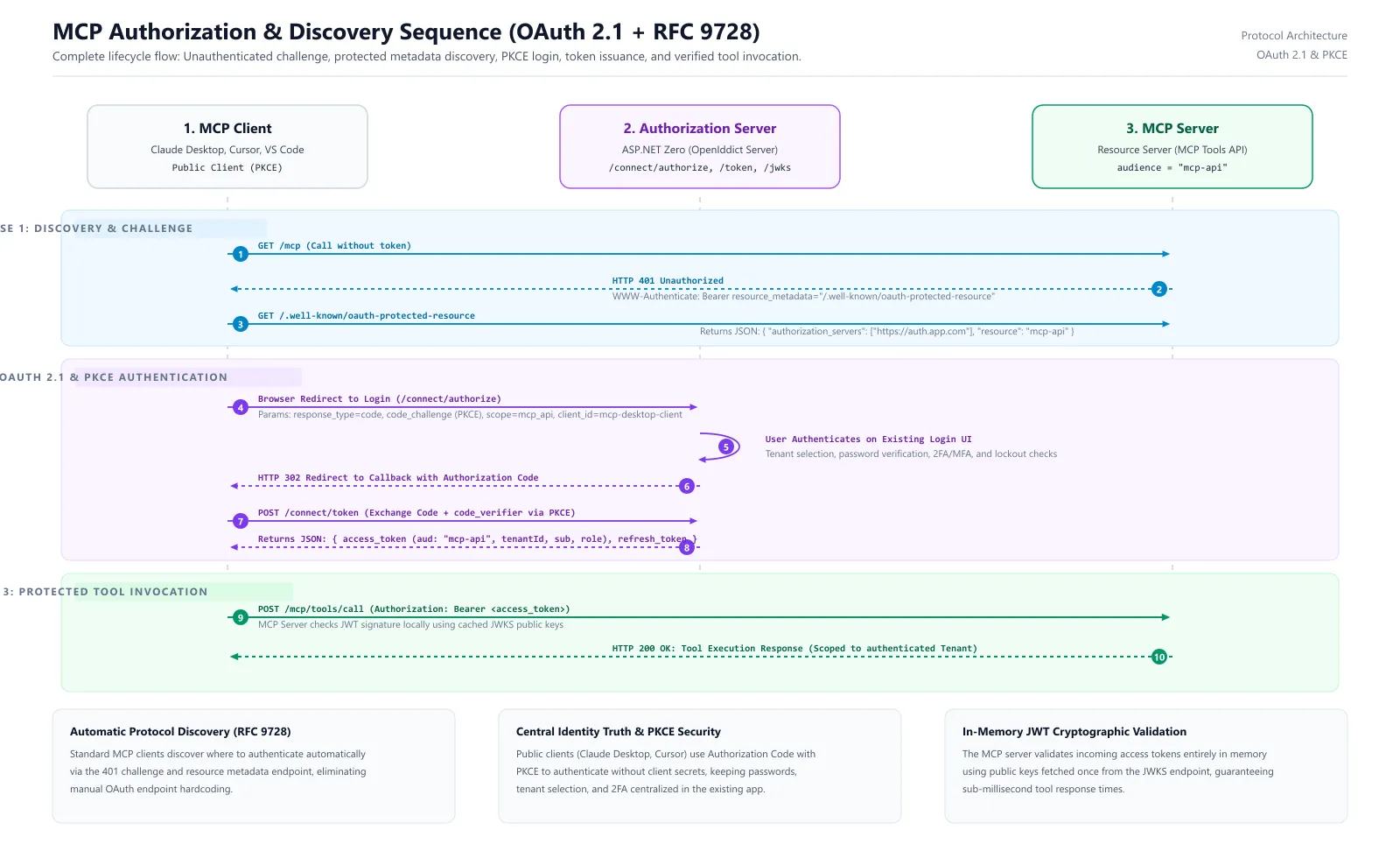
When an unauthenticated MCP client attempts to call the MCP server, the server responds with an HTTP 401 Unauthorized status along with a WWW-Authenticate header. The client reads the server’s /.well-known/oauth-protected-resource endpoint, extracts the authorization server URL, and launches the browser-based authorization flow using Proof Key for Code Exchange (PKCE).
The Recommended Reference Architecture
In this architecture, your existing application acts as the single source of truth for identity, while the MCP server operates as an autonomous, read-only resource server.
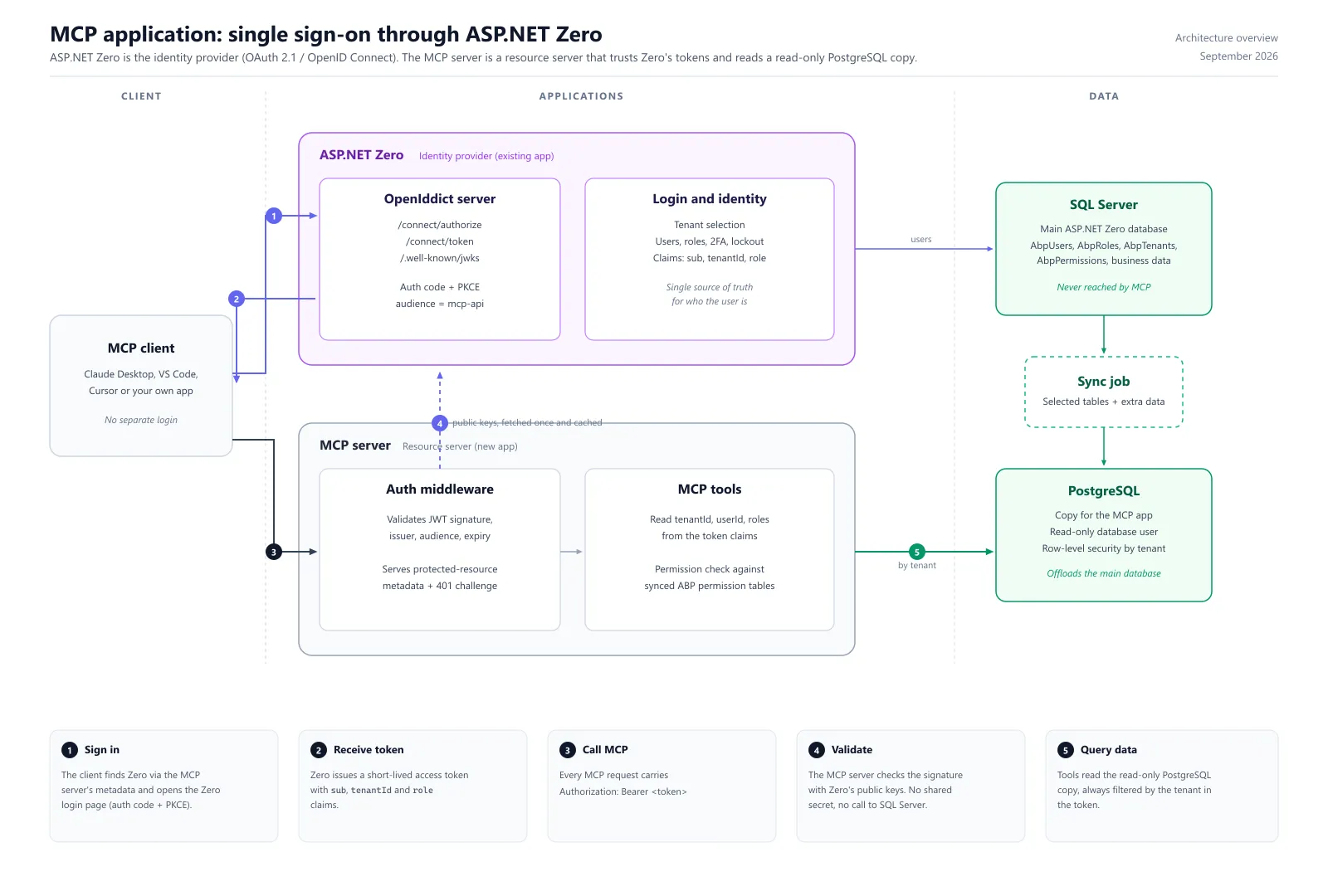
The 5-Step Execution Flow
- Sign In: The MCP client sends an unauthenticated request to the MCP server. The server responds with
401 Unauthorizedand points the client to the existing application’s OpenIddict authorization endpoint. The client opens the standard web login page using Authorization Code Flow with PKCE. - Receive Token: The user signs in through the standard login page (selecting their tenant, entering credentials, and completing 2FA). ASP.NET Zero verifies the credentials and issues a cryptographically signed, short-lived JWT access token with
audience = mcp-apicontainingsub,tenantId, androleclaims. - Call MCP: The MCP client sends tool invocation requests to the MCP server, passing the access token in the
Authorization: Bearer <token>HTTP header. - Validate Locally: The MCP server validates the token’s signature, issuer, audience, and expiration in memory using public keys cached from ASP.NET Zero’s JWKS endpoint. The MCP server makes no network call to the identity server and requires no shared secret.
- Query Isolated Data: The MCP tool extracts the authenticated
tenantIdfrom the verified token claims and queries the read-only database replica. Tenant isolation is enforced at the database level using Row-Level Security (RLS).
Why Reuse the Existing App for Authentication?
Building a separate user management system or generating static API keys for AI assistants creates substantial administrative and security overhead. Reusing your existing application as the OAuth Authorization Server offers decisive benefits:
- Single Identity Source of Truth: Users log in using their established corporate accounts. No passwords or API keys are duplicated across services.
- Tenant Context and Isolation: The existing application resolves whether a user belongs to a specific tenant before issuing the token. The resulting
tenantIdclaim is signed by the identity provider and cannot be forged by the client. - Full Security Policy Preservation: All existing enterprise security layers remain active:
- Multi-Factor Authentication (MFA / TOTP / SMS)
- Single Sign-On (SSO / SAML / Microsoft Entra ID federation)
- Account lockout and brute-force protection
- IP allowlisting and conditional access rules
- Immediate Lifecycle Deactivation: If an employee leaves the company and is deactivated in the main database (
IsActive = false), their active session is terminated, and their ability to authenticate via MCP clients is revoked immediately.
For organizations running multi-tenant enterprise solutions, integrating MCP via existing identity infrastructure ensures complete compliance with SOC 2, HIPAA, and GDPR standards. At Vineforce, our certified teams regularly architect these patterns across our proprietary SaaS platforms, such as Vineforce Teams, as well as enterprise client applications built on ASP.NET Zero development and the ABP.io framework.
Authentication Strategy: Full OAuth 2.1 (OpenIddict) vs. Shared Symmetric JWT
When integrating an MCP server with an existing backend, architects generally evaluate two approaches:
| Architectural Dimension | Option A: Full OAuth 2.1 / OIDC via OpenIddict (Recommended) | Option B: Reusing Internal App JWT via Shared Symmetric Key |
|---|---|---|
| Protocol Compatibility | Fully RFC-compliant. Works natively with Claude Desktop, VS Code, Cursor, and official MCP SDKs. | Incompatible with standard MCP clients. Requires custom proxy scripts or proprietary client modifications. |
| Cryptographic Model | Asymmetric Keys (RS256 / ES256). Auth server holds private key; MCP server only reads public keys via JWKS. | Symmetric Key (HS256). Both the core application and MCP server must store the exact same secret key. |
| Blast Radius of Breach | Isolated. If the MCP server is compromised, attackers obtain public keys only and cannot forge tokens for other services. | Catastrophic. If the MCP server is compromised, attackers obtain the symmetric secret and can mint admin tokens for the main application. |
| Audience Isolation | Enforced via explicit aud: mcp-api claims. Core web API tokens are rejected by the MCP server. | Weak. The same token is often accepted across both the web app and the MCP server. |
| Token Discovery | Built-in via standard /.well-known/oauth-protected-resource and /.well-known/openid-configuration endpoints. | None. Clients must be manually supplied with pre-generated tokens out of band. |
Architectural Recommendation: Always choose Option A. Standard MCP clients expect standard OAuth discovery and PKCE flows. Asymmetric signing guarantees that even a total compromise of the MCP server environment cannot compromise the cryptographic keys of your primary production application.
Step-by-Step Implementation Guide
The following sections walk through configuring the authorization server, building the MCP resource server, and establishing the isolated data layer.
Step 1: Configure the Identity Provider (ASP.NET Zero & OpenIddict)
ASP.NET Zero (version 12 and above) incorporates OpenIddict as its default OpenID Connect and OAuth 2.0 engine.
1. Register the MCP Public Client
Register a public client representing developer tools and desktop clients (such as Claude Desktop or Cursor). Because public clients cannot protect a client secret, configure the client to require PKCE:
// Seed / Startup configuration in your ASP.NET Zero Core project
public async Task SeedMcpOpenIddictClientAsync(
    IOpenIddictApplicationManager applicationManager,
    IOpenIddictScopeManager scopeManager)
{
    // 1. Register the MCP API Scope and Resource Audience
    if (await scopeManager.FindByNameAsync("mcp_api") == null)
    {
        await scopeManager.CreateAsync(new OpenIddictScopeDescriptor
        {
            Name = "mcp_api",
            DisplayName = "MCP Tools Resource Server Scope",
            Resources = { "mcp-api" }
        });
    }

    // 2. Register the Public MCP Client Application
    if (await applicationManager.FindByClientIdAsync("mcp-desktop-client") == null)
    {
        await applicationManager.CreateAsync(new OpenIddictApplicationDescriptor
        {
            ClientId = "mcp-desktop-client",
            DisplayName = "AI Assistant MCP Client",
            Type = OpenIddictConstants.ClientTypes.Public,
            ConsentType = OpenIddictConstants.ConsentTypes.Implicit,
            Permissions =
            {
                OpenIddictConstants.Permissions.Endpoints.Authorization,
                OpenIddictConstants.Permissions.Endpoints.Token,
                OpenIddictConstants.Permissions.GrantTypes.AuthorizationCode,
                OpenIddictConstants.Permissions.GrantTypes.RefreshToken,
                OpenIddictConstants.Permissions.ResponseTypes.Code,
                OpenIddictConstants.Permissions.Scopes.Profile,
                OpenIddictConstants.Permissions.Scopes.Roles,
                OpenIddictConstants.Permissions.Prefixes.Scope + "mcp_api"
            },
            RedirectUris =
            {
                new Uri("http://localhost:3000/callback"),
                new Uri("https://vscode.dev/redirect")
            }
        });
    }
}
2. Ensure Claims Are Added to the Access Token
OpenIddict determines which claims are embedded in the access token versus the identity token. Ensure that tenantid, sub, and role claims are explicitly directed to the access token inside your authorization controller:
// Inside your OpenIddict Token/Authorize Controller
foreach (var claim in principal.Claims)
{
    var destinations = new List<string>
    {
        OpenIddictConstants.Destinations.AccessToken
    };

    // Add key identity claims to both Access Token and Identity Token
    if (claim.Type is OpenIddictConstants.Claims.Subject
                   or OpenIddictConstants.Claims.Role
                   or "tenantid"
                   or "http://schemas.xmlsoap.org/ws/2005/05/identity/claims/nameidentifier")
    {
        destinations.Add(OpenIddictConstants.Destinations.IdentityToken);
    }

    claim.SetDestinations(destinations);
}
3. Disable Access Token Encryption for Cross-Service Validation
By default, OpenIddict encrypts access tokens using a private encryption key. Because the MCP server is an external resource server that validates tokens using JWKS public keys, configure OpenIddict to issue signed, unencrypted JWTs:
// In Web.Core / Startup configuration
services.AddOpenIddict()
    .AddServer(options =>
    {
        options.SetAuthorizationEndpointUris("/connect/authorize")
               .SetTokenEndpointUris("/connect/token")
               .SetJwksEndpointUris("/.well-known/jwks");

        // Allow authorization code flow with PKCE
        options.AllowAuthorizationCodeFlow()
               .RequireProofKeyForCodeExchange();

        // Issue standard unencrypted JWTs validated via JWKS
        options.DisableAccessTokenEncryption();

        // Register signing and encryption certificates
        options.AddDevelopmentEncryptionCertificate()
               .AddDevelopmentSigningCertificate();

        options.UseAspNetCore()
               .EnableAuthorizationEndpointPassthrough()
               .EnableTokenEndpointPassthrough();
    });
Step 2: Build the MCP Server as an OAuth Resource Server
The MCP server is a standalone ASP.NET Core service using the official ModelContextProtocol.AspNetCore package alongside standard JWT Bearer authentication.
1. Configure Configuration Settings (appsettings.json)
{
  "Authentication": {
    "Authority": "https://identity.yourproductionapp.com",
    "Audience": "mcp-api"
  },
  "ConnectionStrings": {
    "ReadOnlyDatabase": "Host=replica.db.internal;Database=app_replica;Username=mcp_readonly_user;Password=SecurePassword123;"
  }
}
2. Configure Service Startup (Program.cs)
using Microsoft.AspNetCore.Authentication.JwtBearer;
using Microsoft.IdentityModel.Tokens;

var builder = WebApplication.CreateBuilder(args);

var authority = builder.Configuration["Authentication:Authority"]!;
var audience = builder.Configuration["Authentication:Audience"]!;

// 1. Configure in-memory JWT validation against the Authority's JWKS
builder.Services.AddAuthentication(JwtBearerDefaults.AuthenticationScheme)
    .AddJwtBearer(options =>
    {
        options.Authority = authority;
        options.Audience = audience;
        options.RequireHttpsMetadata = true;
        options.TokenValidationParameters = new TokenValidationParameters
        {
            ValidateIssuer = true,
            ValidIssuer = authority,
            ValidateAudience = true,
            ValidAudience = audience,
            ValidateLifetime = true,
            ClockSkew = TimeSpan.FromSeconds(30)
        };
    });

builder.Services.AddAuthorization();

// 2. Add MCP Server with Protected Resource Metadata
builder.Services.AddMcpServer(options =>
{
    options.ServerInfo = new() { Name = "Production-Data-MCP", Version = "1.0.0" };
    options.ResourceMetadata = new()
    {
        AuthorizationServerUrl = new Uri(authority),
        ResourceIdentifier = audience
    };
});

// Register data repositories
builder.Services.AddScoped<IReadOnlyCustomerRepository, ReadOnlyCustomerRepository>();

var app = builder.Build();

app.UseAuthentication();
app.UseAuthorization();

// 3. Map MCP endpoints with authorization enforcement
app.MapMcp().RequireAuthorization();

app.Run();
3. Implement Tenant-Aware MCP Tools
The MCP tool signature must never accept tenantId from the AI client. Extract the tenant ID directly from the authenticated ClaimsPrincipal:
using System.Security.Claims;
using ModelContextProtocol.NET.Server;

[McpTool("get_customer_metrics", "Retrieves customer summary metrics and sales trends.")]
public async Task<CustomerMetricsDto> GetCustomerMetricsAsync(
    [McpParameter(true, "The unique customer account code")] string customerCode,
    ClaimsPrincipal user,
    [FromServices] IReadOnlyCustomerRepository repository)
{
    // Extract tenantId strictly from authenticated claims
    var tenantClaim = user.FindFirst("tenantid")?.Value
                   ?? user.FindFirst("http://schemas.microsoft.com/identity/claims/tenantid")?.Value;

    if (string.IsNullOrEmpty(tenantClaim) || !int.TryParse(tenantClaim, out var tenantId))
    {
        throw new UnauthorizedAccessException("Request does not contain a valid tenant claim.");
    }

    // Execute query strictly scoped to the authenticated tenant
    return await repository.GetCustomerMetricsAsync(tenantId, customerCode);
}
Step 3: Establish the Isolated Read-Only Data Layer
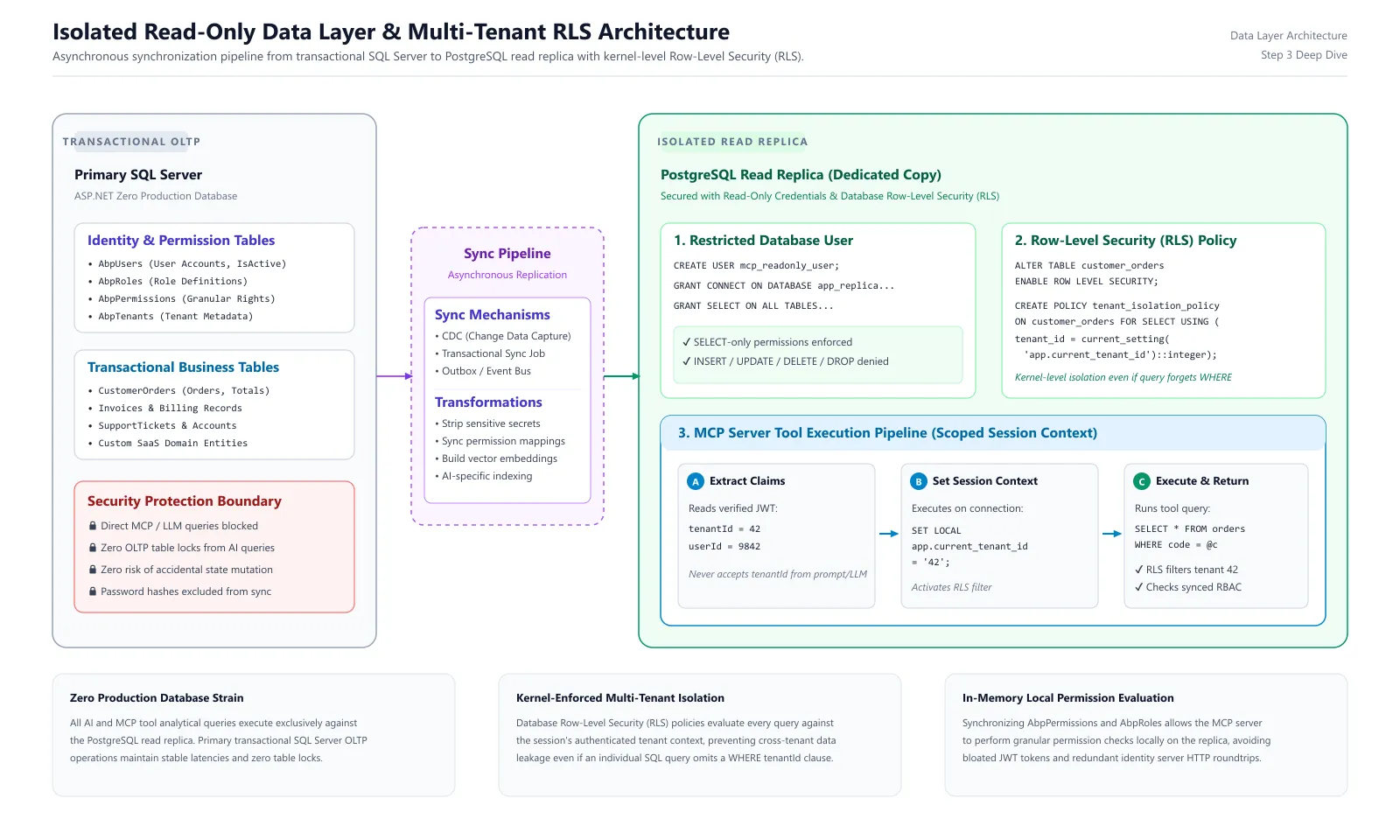
To protect your primary database (e.g., SQL Server) from unpredictable analytical queries, sync data asynchronously to a dedicated read-only database (such as a PostgreSQL instance, a SQL Server AlwaysOn read replica, or a MySQL replica).
1. Configure Row-Level Security (RLS) on PostgreSQL
To guarantee tenant isolation even if an application query accidentally omits a WHERE tenant_id = @tenantId clause, configure Row-Level Security directly in the database engine:
-- 1. Enable RLS on the synchronized table
ALTER TABLE customer_metrics ENABLE ROW LEVEL SECURITY;

-- 2. Define an isolation policy linked to the current connection session variable
CREATE POLICY tenant_isolation_policy ON customer_metrics
    FOR SELECT
    USING (tenant_id = NULLIF(current_setting('app.current_tenant_id', true), '')::integer);

-- 3. Create a restricted read-only user for the MCP server
CREATE USER mcp_readonly_user WITH PASSWORD 'SecurePassword123';
GRANT CONNECT ON DATABASE app_replica TO mcp_readonly_user;
GRANT USAGE ON SCHEMA public TO mcp_readonly_user;
GRANT SELECT ON ALL TABLES IN SCHEMA public TO mcp_readonly_user;
2. Execute Scoped Queries in the Repository
Set the session variable on the database connection before executing the query:
public class ReadOnlyCustomerRepository : IReadOnlyCustomerRepository
{
    private readonly string _connectionString;

    public ReadOnlyCustomerRepository(IConfiguration configuration)
    {
        _connectionString = configuration.GetConnectionString("ReadOnlyDatabase")!;
    }

    public async Task<CustomerMetricsDto> GetCustomerMetricsAsync(int tenantId, string customerCode)
    {
        await using var connection = new NpgsqlConnection(_connectionString);
        await connection.OpenAsync();

        // Set the session tenant context for Row-Level Security
        await using (var cmd = new NpgsqlCommand("SET LOCAL app.current_tenant_id = @tenantId;", connection))
        {
            cmd.Parameters.AddWithValue("tenantId", tenantId.ToString());
            await cmd.ExecuteNonQueryAsync();
        }

        // Execute query under RLS protection
        var query = @"
            SELECT customer_code, total_spend, open_tickets, risk_score
            FROM customer_metrics
            WHERE customer_code = @customerCode";

        return await connection.QuerySingleOrDefaultAsync<CustomerMetricsDto>(
            query, new { customerCode });
    }
}
3. Checking Fine-Grained Permissions Locally
Because JWT access tokens have size limits, they carry user roles (such as Admin or Manager), not hundreds of granular application permissions (such as Pages.CustomerMetrics.View).
By synchronizing the permission tables (AbpPermissions, AbpUserRoles, AbpRoles) from ASP.NET Zero to the replica database, your MCP tools can check fine-grained user permissions locally without calling back to the primary authorization server.
Token Validation Deep Dive: Local JWT Validation vs. Remote Introspection
When designing token verification for an MCP resource server, architects must choose between Local In-Memory Validation and Remote Token Introspection (RFC 7662):
| Architectural Metric | Local JWT Validation (Recommended) | Remote Token Introspection (RFC 7662) |
|---|---|---|
| Calls to Identity Provider | Zero per request. Public signing keys are downloaded once from /.well-known/jwks and cached in memory. | One network HTTP request per tool invocation. |
| Validation Latency | < 1 millisecond. Purely in-memory cryptographic signature and expiration check. | 20 to 150+ milliseconds. Bound by internal network roundtrips and auth server load. |
| Identity Server Overhead | Negligible. The identity server only handles initial user logins and periodic JWKS refreshes. | High. High-frequency AI tool loops directly multiply request volume against the identity server. |
| Revocation Latency | Token remains valid until the exp timestamp (typically 5 to 15 minutes). | Instantaneous. The identity server rejects revoked tokens immediately. |
| Network Resilience | High. The MCP server continues validating requests even during temporary identity server network downtime. | Low. If the identity server experiences downtime or network latency, all MCP tools fail. |
| Optimal Use Case | Standard production deployments. Ideal for high-performance AI tool execution. | Regulated financial or defense environments where instantaneous sub-second revocation is legally mandated. |
The Recommended Hybrid Approach
To achieve sub-millisecond validation speeds without sacrificing security:
- Short Access Token Lifespans: Configure OpenIddict to issue access tokens that expire after 5 to 15 minutes.
- Refresh Tokens with PKCE: Allow MCP clients to silently refresh expired tokens using refresh tokens.
- Local User Status Check: When an MCP tool queries the read-only replica, perform a lightweight check against the replicated
AbpUserstable to verifyIsActive == true. If an administrator deactivates a user in the main application, the sync job updates the replica within seconds, causing subsequent tool queries to fail immediately even if the access token has not yet reached its expiration timestamp.
Production Security Checklist
Review this checklist before deploying an MCP server to production:
- Audience Validation: Verify that the MCP server strictly validates
Audience = mcp-apiand rejects general web or mobile API tokens. - Asymmetric Cryptography Only: Ensure signing uses RS256, ES256, or EdDSA. Never share symmetric HMAC secrets between different server clusters.
- No Client-Supplied Tenant Identifiers: Confirm that no MCP tool accepts
tenantIdas an input parameter. The tenant context must always originate from verified token claims. - Dedicated Read-Only Database Account: Ensure the database user account used by the MCP server possesses only
SELECTprivileges. Deny allINSERT,UPDATE,DELETE,DROP,ALTER, and stored procedure execution rights. - Explicit Handling of Host Users: Verify how host administrators (users where
tenantId == null) are handled. Prevent host accounts from executing broad queries across all tenant data unless a tool is explicitly designed for administrative auditing. - Structured Audit Logging: Record every MCP tool invocation with
Timestamp,UserId,TenantId,ToolName, and execution duration. Never log raw prompt text containing sensitive Personally Identifiable Information (PII). - Rate Limiting: Apply per-user and per-tenant rate limits on the MCP endpoints to prevent misconfigured AI loops from exhausting database replica connections.
- Guard Mutation Tools: Never expose write operations to an MCP server without explicit, fine-grained permission checks and human-in-the-loop confirmation steps.
Common Pitfalls to Avoid
- Unreadable Encrypted OpenIddict Tokens: OpenIddict enables token encryption by default. If your MCP server fails to parse Bearer tokens with cryptographic errors, confirm that OpenIddict has
.DisableAccessTokenEncryption()enabled or that decryption certificates are properly distributed. - Missing Claims in Access Tokens: OpenIddict isolates identity claims from access token claims. If
user.FindFirst("tenantid")returns null, verify that your authorization controller explicitly assignsOpenIddictConstants.Destinations.AccessTokento the claim. - Omitting Tenant Filters on the Data Replica: When querying a raw PostgreSQL database or SQL replica outside the ABP / ASP.NET Zero framework pipeline, built-in EF Core filters do not apply automatically. You must enforce tenant isolation manually in your SQL queries and through database Row-Level Security.
- Excessively Long Token Lifespans: Setting access token lifespans to multiple hours or days expands the window of vulnerability if a token is intercepted. Maintain access token lifespans between 5 and 15 minutes.
- Embedding Full Permission Sets into the JWT: Do not embed hundreds of granular permission strings into the JWT payload. Doing so causes HTTP header overflow errors. Instead, sync permission mapping tables to the read replica and evaluate permissions within the MCP tool execution pipeline.
Adapting the Pattern to Other Technology Stacks
While this guide uses ASP.NET Zero and SQL Server as a concrete reference, the underlying architectural pattern is completely stack-agnostic:
- Alternative Identity Providers: If your organization uses Keycloak, Auth0, Microsoft Entra ID, or Amazon Cognito, configure an API Resource representing your MCP server (
mcp-api), create a public client with PKCE for your AI desktop tools, and map your application’s tenant identifier into the JWT claims. - Alternative MCP Server Frameworks: If your team builds MCP tools using Python (FastAPI / FastMCP) or TypeScript / Node.js, the validation mechanics remain identical: use libraries like
PyJWTorjoseto validate tokens in memory against your identity provider’s standard JWKS endpoint (/.well-known/jwks). - Alternative Data Replicas: The read-only data layer works seamlessly with MySQL Read Replicas, Amazon Aurora Read Replicas, Snowflake, or ClickHouse data warehouses.
Related Engineering Resources
To learn more about multi-tenant architecture, AI integration, and secure application hosting, explore our related technical guides:
- MCP for Multi-Tenant SaaS: How to Keep Customer Data Isolated
- How to Build a Secure MCP Server for Enterprise Applications
- How to Hire Experienced ASP.NET Zero Developers for Enterprise SaaS
- Vineforce Official Partnership with ASP.NET Zero
- Docker for ASP.NET Zero SaaS in Easy Deployment
Frequently Asked Questions (FAQ)
Why shouldn’t an MCP server connect directly to the primary production database?
Connecting AI tools directly to a primary OLTP database creates severe risks: unbounded queries generated by LLMs can exhaust database connections or lock critical transactional tables. It also increases the blast radius of prompt injection attacks and bypasses application-level multi-tenant filters.
How does an MCP client authenticate against an existing application without a separate user store?
The MCP server acts as an OAuth 2.1 resource server that points to the existing app as the authorization server. When an MCP client connects, it receives a 401 challenge, discovers the authorization server metadata, and redirects the user to the existing login page with PKCE, preserving all existing 2FA and tenant selection controls.
Why should an MCP server validate JWTs locally instead of using token introspection?
Local JWT validation uses public keys fetched once from the authorization server’s JWKS endpoint and cached in memory. This eliminates per-request HTTP calls to the identity provider, keeps tool response latencies under 1 millisecond, and prevents identity server exhaustion during high-frequency AI loops.
How do you enforce multi-tenant isolation when querying a replica database without framework filters?
Extract the tenantId strictly from authenticated JWT token claims inside the MCP tool execution pipeline, and enforce isolation at the database layer using Row-Level Security (RLS) policies or parameterized queries tied to database session variables. Never accept tenantId as an argument from the LLM.
Can this architecture be applied to stacks other than ASP.NET Zero and SQL Server?
Yes. The architecture is completely engine- and framework-agnostic. The authorization server can be Keycloak, Auth0, or Microsoft Entra ID; the MCP server can be built in Python or Node.js; and the read replica can run on PostgreSQL, MySQL, Amazon Aurora, or a cloud data warehouse.
Conclusion
Exposing an existing enterprise application to AI assistants through the Model Context Protocol does not require compromising security or creating parallel identity silos. By delegating authentication to your established application via OpenIddict and OAuth 2.1, validating short-lived access tokens locally using cached JWKS public keys, and isolating all data access to a dedicated read replica with Row-Level Security, you establish a high-performance, zero-trust bridge between modern AI assistants and your core business systems.
TL;DR
- Single Sign-On via OAuth 2.1: Use your existing app as the Authorization Server with OpenIddict and PKCE so users authenticate through their standard login page with 2FA and tenant selection.
- Zero-Latency In-Memory Validation: Validate JWT signatures locally on the MCP server using public keys cached from the authorization server’s JWKS endpoint.
- Strict Claims-Based Tenant Isolation: Never accept
tenantIdas a tool argument from the LLM; extract it strictly from verified JWT token claims. - Isolated Read-Only Replica: Route all MCP queries to a separate database replica with a
SELECT-only user, protecting your primary OLTP database from AI query spikes. - Database-Level Defense-in-Depth: Enforce tenant boundaries using Row-Level Security (RLS) on the replica and check fine-grained permissions against synced role tables.